security · basics
Are Short Links Safe? How to Check One Before You Click
Four checks to run on a short link before you click, the warning signs of a deceptive link, and how to share links people will trust.
8 min read
basics · how-to
Every way to shorten a link: instantly with no account, with a custom alias, on your own domain, with a password or expiry, or in bulk with the API.
Shortening a URL takes one click, and for a link you'll share once that's all it needs. The interesting question is what you want the link to do afterwards — carry your name, be readable aloud, stop working after Friday, count its clicks — because each of those is a different way of shortening, and picking the right one up front saves reprinting, reposting and re-explaining. This guide covers every method from the quick one to the automated one, when each is the right choice, and what to do with the link once you have it.
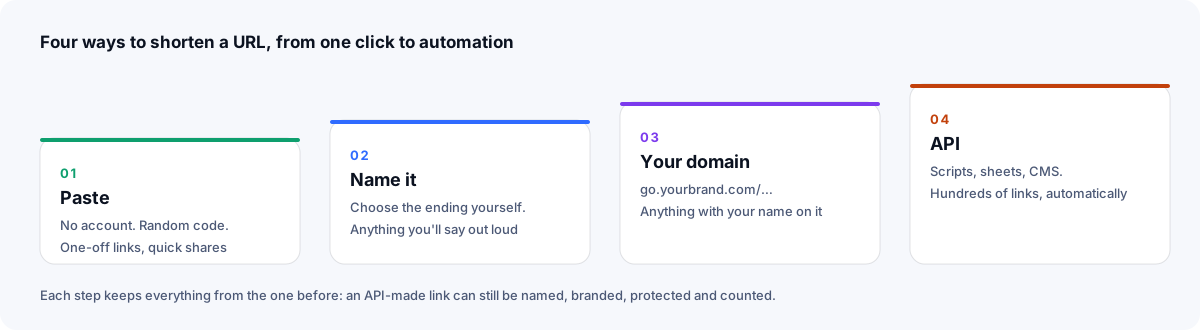
For a link you'll share once and don't need to manage.
You get a link like xlyl.link/kZHTt5, copied and ready. It works immediately and redirects with a 302. What it doesn't have is a name you chose, and because it isn't attached to an account, you can't edit it later and its clicks aren't counted: there's no statistics page for it. If you'll want the numbers, sign in before you create the link.
Good for: a link in a chat, a one-off share, testing the service.
For anything a person will read, say or type.
spring-sale, menu, webinar.The link is now xlyl.link/spring-sale. Aliases are unique per domain, so if someone has taken /spring-sale on the shared domain you'll be told; that's the moment to consider your own domain, where every alias is free.
The naming guide covers what makes a good alias: lowercase, hyphens, plain words, under about 30 characters, nothing that will be wrong next year.
Good for: anything on a slide, in print, spoken on a podcast, or in a post people will screenshot.
For anything with your name on it — which, for a business, is everything.
go.yourbrand.com. (Where the page also offers a CNAME, that works for a subdomain too.)The link becomes go.yourbrand.com/spring-sale, served over HTTPS once the domain's certificate is in place; the check shows Working once it is ready. The custom domain guide walks through the DNS step, with Cloudflare as the worked example, and the custom URL shortener page explains what a recognisable domain tells the person deciding whether to tap.
Good for: every link a customer, reader or follower will see.
Both are in the same advanced options panel and combine with everything above.
Password. Type one in the Password field. Visitors get a form instead of a redirect, and the destination isn't sent to their browser until the password is right. This is real protection, unlike an obscure alias, whose destination is one preview away. Password-protected links suit drafts, previews, recordings and anything you'd rather not have forwarded.
Expiry. Set a lifetime — 30m, 8h, 7d — in the Expires in field. After it passes, the link returns a not-found page and its alias is freed. Expiring links suit time-boxed offers, event registration, and download links that shouldn't circulate forever.
Description. Not a protection, but set it now: what the link is for, who made it, the campaign. The dashboard searches descriptions, so this is how you'll find the link in six months.
For a spreadsheet of placements, a CMS that should shorten every article, a script that makes a link per customer, or anything else where a person clicking a form is the bottleneck.
X-API-Key header:curl -X POST https://xlyl.link/api/v2/links \
-H "X-API-Key: YOUR_API_KEY" \
-H "Content-Type: application/json" \
-d '{"target":"https://example.com/spring","customurl":"spring-sale","description":"Spring 2026 · newsletter"}'
The whole address is stored as the destination, query string and all — the ? and & separators are part of the URI syntax defined in RFC 3986, and the redirect reproduces them exactly.
The response contains the short link. Every option the form has — alias, domain, password, expiry, description — is a field in the request, and the same key lists, edits and deletes links and reads their statistics. The API reference documents the endpoints for links, statistics, click exports, domains and users; the key page shows samples in curl and JavaScript that already contain your key.
Good for: bulk, automation, integration. There's no bulk upload form because a ten-line script handles any spreadsheet and any rule you want to apply to it. The API has the same creation limits as the form (a set number of links per account in any 24 hours, plus a short-term rate limit), so pace a large list.
| You want to… | Method |
|---|---|
| Share a link once in a chat | Paste (1) |
| Put a link on a slide, in print, or say it aloud | Alias (2) |
| Put your brand on it | Your domain (3) |
| Keep a preview or draft from being forwarded | Password (4) |
| Have a link stop working after an event | Expiry (4) |
| Make dozens of links from a list | API (5) |
| Track a campaign across channels | Alias per placement (2 or 3) + UTM tags |
| Print a QR code | Alias on your domain (3) + QR code |
The methods stack. An API-made link can be on your domain, named, password-protected, expiring and described, all in one request.
Copy it from the dashboard, not by retyping. Every link has a copy button; retyping is how l becomes 1.
Get the QR code if it's going on anything physical. The QR icon on the link shows a code that encodes the short link, ready to download as SVG or PNG, so the printed code stays valid however often you change the destination. The QR guide covers size and placement.
Watch the statistics page. For links made while signed in: clicks by hour and day, referrers, countries, devices — with known bots filtered out by user agent and no visitor IPs stored. For a campaign, make a separate link per placement so each count means something.
Edit it when things change. Target, description, password and expiry can all be changed from the link's row (a password or expiry can be changed but not removed). The short link stays the same; only where it goes moves. This is the single most useful thing about a shortener and the reason to use one even for links that don't need to be short. Changing the alias is different: it changes the address itself, and the old short link stops working at once, with nothing redirecting from it, so don't rename a link that's already been shared.
x7Fq2 is a lost visitor waiting to happen.security · basics
Four checks to run on a short link before you click, the warning signs of a deceptive link, and how to share links people will trust.
· 8 min read
basics · analytics
The lookup, the redirect, 301 vs 302 vs 307, where click analytics come from, why some links are slow, and what a short link can't hide.
· 12 min read
affiliate · marketing
How affiliates tidy long tracking URLs, measure which placement earns, re-point links when a program changes, and stay within disclosure rules.
· 8 min read