Developers
URL shortener API
Links, custom domains and click statistics in Xlyl are all available over a JSON REST API, so you can shorten links from your own application, a CI pipeline or a bot.
API key and authentication
Sign in, open API key and generate a key. The key is shown once, at the moment it is created — only a hash of it is stored, so it cannot be recovered later. If you lose it, generate another, which revokes the previous one immediately. The quick-start samples on that page are filled in with your new key, so the first request is a copy and paste.
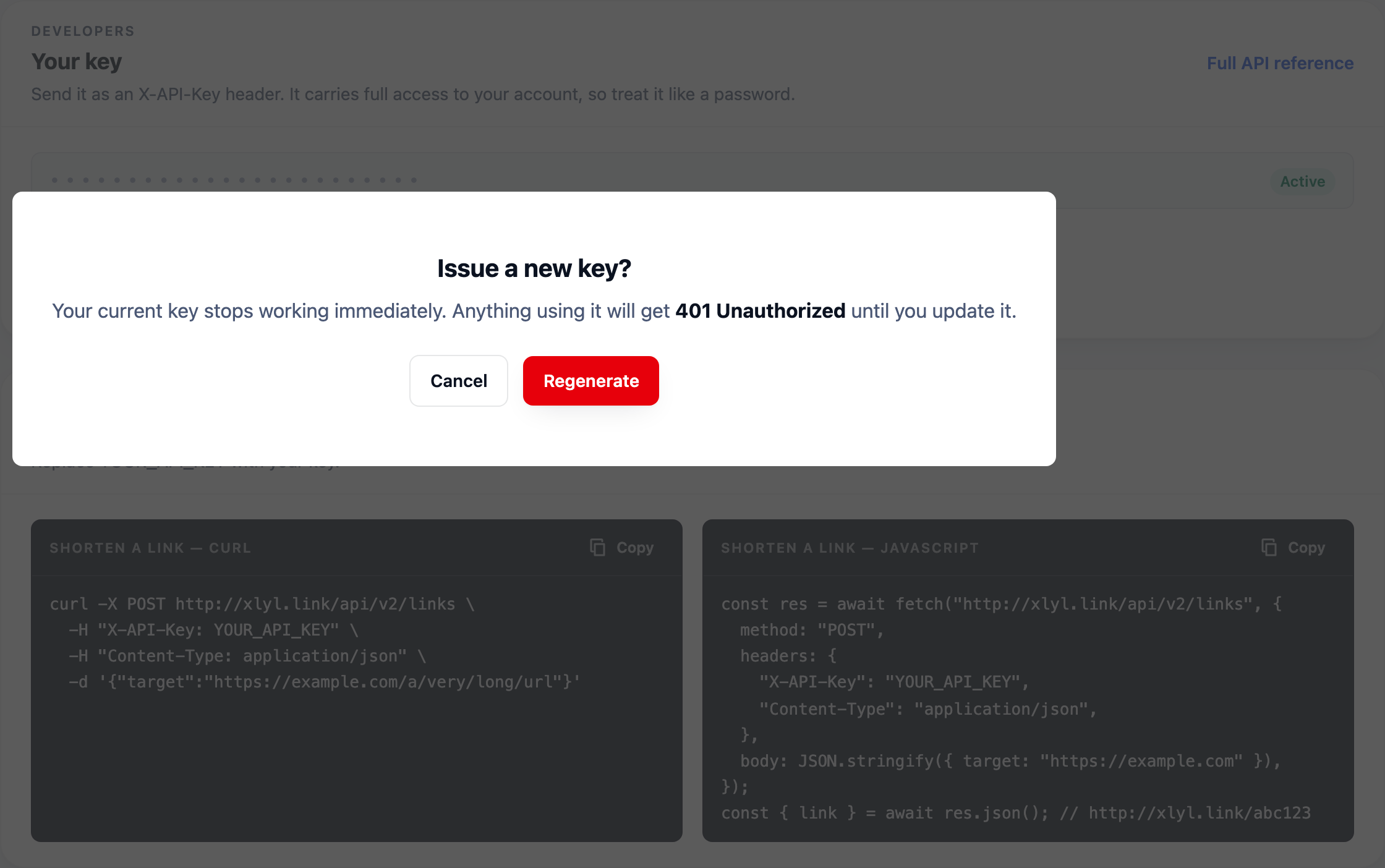
Treat it like a password. It authenticates as your account, so keep it server-side and never ship it in client-side JavaScript. Send it in an X-API-Key header:
curl https://xlyl.link/api/v2/users \
  -H "X-API-Key: YOUR_API_KEY"
A token from POST /api/v2/auth/login also works, as Authorization: Bearer <token>. The web interface uses an httpOnly session cookie instead.
A wrong or revoked key is refused with 401 on every endpoint. POST /links can also be called with no key at all, to create an anonymous link where this site allows it; such requests may have to pass a CAPTCHA and wait out a cooldown between links from the same address, so use a key for anything automated. Send a key and it has to be valid. GET /users, above, is a quick way to check one.
Endpoints
Every path is relative to https://xlyl.link/api/v2. Requests and responses are JSON (send Content-Type: application/json with a body), and every :id is the UUID the API returned as id.
| Method | Path | Does |
|---|---|---|
POST | /links | Create a link |
GET | /links | List, search and sort your links |
PATCH | /links/:id | Edit a link |
DELETE | /links/:id | Delete a link |
GET | /links/:id/stats | Click totals for one link |
GET | /links/stats | Click totals for the whole account, last 30 days |
GET | /links/:id/insights | Per-click breakdowns and unique visitors |
GET | /links/:id/visits | The most recent clicks |
GET | /links/:id/visits.csv | Every click in a period, as CSV |
POST | /domains | Add a custom domain |
GET | /domains/:id/check | Check whether a domain works |
DELETE | /domains/:id | Remove a domain from your account |
GET | /users | Your account, totals and domains |
Links
Create a link
POST /links returns 201 with the new link.
curl -X POST https://xlyl.link/api/v2/links \
  -H "X-API-Key: YOUR_API_KEY" \
  -H "Content-Type: application/json" \
  -d '{
    "target": "https://example.com/a/very/long/url",
    "customurl": "spring-sale",
    "description": "Q2 campaign",
    "expire_in": "7 days",
    "password": "optional"
}'| Field | Type | Rules |
|---|---|---|
target | string, required | The destination, up to 2,040 characters. Without a scheme, http:// is added. Links to xlyl.link itself are refused. |
customurl | string, optional | The alias: 1–64 letters, digits, - or _, unique on its domain. A few paths the site uses itself, such as login or api, are reserved. Omit it for a generated address. |
domain | string, optional | The address of one of your custom domains, for example go.example.com. Omit it for xlyl.link. |
password | string, optional | 3–64 characters. Visitors must enter it to continue. |
expire_in | string, optional | A duration such as 30m, 8h or 7 days; at least one minute. |
description | string, optional | Up to 2,040 characters. Searchable. |
reuse | boolean, optional | If you already have a link to this target on this domain, return it (200) instead of creating another. |
The response is the link object:
{
  "id": "6f1c0b52-…",
  "address": "spring-sale",
  "target": "https://example.com/a/very/long/url",
  "description": "Q2 campaign",
  "expire_in": "2026-09-30T10:00:00.000Z",
  "password": true,
  "visit_count": 0,
  "created_at": "2026-09-23T10:00:00.000Z",
  "updated_at": "2026-09-23T10:00:00.000Z",
  "link": "https://xlyl.link/spring-sale"
}
password comes back as a boolean — true here, because the request set one — never the value itself. Links also carry banned and, when they are on a custom domain, domain with its address.
Create a link on your own domain
Connect the domain first (see Domains), then pass its address — the host name alone, no scheme or path — in domain:
curl -X POST https://xlyl.link/api/v2/links \
  -H "X-API-Key: YOUR_API_KEY" \
  -H "Content-Type: application/json" \
  -d '{
    "target": "https://example.com/launch",
    "customurl": "launch",
    "domain": "go.example.com"
  }'
The response's domain is go.example.com and link is the short link on it. A domain that is not on your account is refused with 400 and You can't use this domain.
List, search and paginate
curl "https://xlyl.link/api/v2/links?limit=50&skip=50&sortBy=visit_count%20DESC&search=campaign" \
-H "X-API-Key: YOUR_API_KEY"| Query | Meaning |
|---|---|
limit | Links per page: 10 by default, at most 50. |
skip | How many to skip, for the next page. 0 by default. |
search | Matches the description, alias, target and domain. |
sortBy | A column and a direction: created_at, updated_at, visit_count, address, target, description or expire_in, then ASC or DESC. Anything else falls back to created_at DESC, the default. |
date | from,to: two dates (2026-09-01,2026-09-21, each a whole day in the server's time zone) or two UTC instants (2026-09-01T00:00:00Z,2026-09-21T23:59:59Z). Only links clicked in the range are listed, with visit_count counting clicks in the range and total_count all clicks. A malformed value is ignored. |
The response wraps a page of link objects with the numbers you need to fetch the next one:
{
  "total": 132,
  "limit": 50,
  "skip": 50,
  "data": [ { "id": "6f1c0b52-…", "address": "spring-sale", … } ]
}
Keep adding limit to skip until it reaches total.
Edit a link
PATCH /links/:id takes any of target, address (the alias), description, expire_in and password, with the same rules as creation, and returns the updated link. At least one is required. A password or expiry can be set or changed but not removed, and the domain cannot be changed.
# change where an existing link points
curl -X PATCH https://xlyl.link/api/v2/links/LINK_ID \
  -H "X-API-Key: YOUR_API_KEY" \
  -H "Content-Type: application/json" \
  -d '{"target": "https://example.com/new-destination"}'
Changing the target keeps the short link as it is. Changing address changes the short link: the old one stops working immediately and nothing redirects from it.
Statistics
Clicks are counted for links made with an account; bots are left out by their user agent. Unique visitors are an estimate from a daily-salted hash, not a count of people.
Totals for one link
curl https://xlyl.link/api/v2/links/LINK_ID/stats \
  -H "X-API-Key: YOUR_API_KEY"
Returns the link object plus lastDay (24 hourly buckets), lastWeek (7 days), lastMonth (30 days) and allTime (18 months). Each has views, the clicks per bucket, and stats, lists of { "name", "value" } for browser, os, country and referrer. updatedAt says when they were computed: results are cached for a minute, or five on links with more than 50,000 clicks.
{
  "lastDay": {
    "views": [0, 0, 3, …],
    "stats": {
      "browser": [{ "name": "chrome", "value": 12 }, …],
      "os": [{ "name": "android", "value": 9 }, …],
      "country": [{ "name": "gb", "value": 7 }, …],
      "referrer": [{ "name": "direct", "value": 5 }, …]
    }
  },
  "lastWeek": { … }, "lastMonth": { … }, "allTime": { … },
  "updatedAt": "…",
  "id": "6f1c0b52-…", "address": "spring-sale", "visit_count": 214, …
}
Totals for the account
GET /links/stats returns the same four periods across all of your links, without the link fields. It is built from the last 30 days only — so allTime here covers those 30 days — and is cached for up to 30 minutes.
Insights
GET /links/:id/insights?window=7d reads the per-click detail. window is 24h, 7d (the default), 30d or 90d.
{
  "window": "7d",
  "totals": { "clicks": 214, "visitors": 180 },
  "series": [{ "at": "2026-09-17T00:00:00.000Z", "clicks": 30, "visitors": 26 }, …],
  "breakdowns": {
    "country": [{ "name": "GB", "count": 90 }, …, { "name": "Other", "count": 12 }],
    "utm_campaign": [{ "name": "spring", "count": 120 }],
    …
  },
  "filtered": [{ "name": "bot", "count": 41 }, { "name": "repeat", "count": 9 }],
  "id": "6f1c0b52-…", "address": "spring-sale", …
}
breakdowns has country, region, city, device, browser, browser_version, os, os_version, referrer, referrer_url, channel, language, app (the app the link was opened in, when known) and the five utm_* tags; each lists its top six values, with the rest folded into Other. Per-click detail is kept for 365 days.
Every number above counts people only. filtered counts the clicks left out, by reason: bot (a self-declared crawler, preview fetcher or script), preview (a prefetch or HEAD request), not-a-page (fetched or embedded rather than opened), no-language (no Accept-Language), spoofed (a browser string without that browser's headers), datacenter (a cloud server) and repeat (the same visitor within 30 seconds). At most 1,000 filtered clicks are kept per link per day, so on a link under heavy bot traffic it is a lower bound.
Recent clicks
GET /links/:id/visits?limit=50 returns the newest clicks, 50 by default and at most 200, as { "visits": [...] }. Each has created_at, country, city, device, browser, os, referrer_host, app, channel, utm_source, utm_campaign and is_unique. Filtered clicks are not included.
Export clicks as CSV
curl -o clicks.csv "https://xlyl.link/api/v2/links/LINK_ID/visits.csv?days=365" \
  -H "X-API-Key: YOUR_API_KEY"
days is 30 by default and at most 365, and one file holds at most 50,000 clicks, newest first. Columns: time, location (country, region, city), device, browser and OS with versions, channel, referrer host and full referrer URL, the five UTM tags, language, app, is_unique and filtered_reason. Filtered clicks are included so the filter can be checked; an empty filtered_reason is a counted click. It can only go as far back as per-click detail is kept (365 days).
Domains
Your domains, each with its id, are listed in GET /users; there is no separate list endpoint.
Add a domain
curl -X POST https://xlyl.link/api/v2/domains \
  -H "X-API-Key: YOUR_API_KEY" \
  -H "Content-Type: application/json" \
  -d '{"address": "go.example.com", "homepage": "https://example.com"}'
address is required, 3–64 characters; a leading www. is dropped. It cannot be xlyl.link or a domain already on an account. homepage, optional, is where visitors are sent when they open the domain itself or an address on it with no link. Returns 201:
{
  "id": "0b7e41d2-…",
  "address": "go.example.com",
  "homepage": "https://example.com",
  "check_status": null,
  "checked_at": null,
  "created_at": "2026-09-23T10:00:00.000Z",
  "updated_at": "2026-09-23T10:00:00.000Z"
}
Adding the domain does not set up its DNS; the custom domain guide covers that.
Check a domain
GET /domains/:id/check requests the domain itself, reads its DNS to explain any failure, and stores the outcome:
{
  "address": "go.example.com",
  "status": "working",
  "ok": true,
  "expected": { "ip": "…", "cname": null },
  "a": ["…"],
  "cname": [],
  "error": null,
  "checkedAt": "2026-09-23T10:05:00.000Z"
}| status | Meaning |
|---|---|
working | The domain reaches this server over HTTPS. |
certificate | It reaches this server, but its HTTPS certificate is not valid. |
no_https | It reaches this server over plain HTTP only. |
not_served | DNS points here, but the server does not answer for it. |
cloudflare | It resolves to Cloudflare and does not reach this server. |
elsewhere | It resolves to some other address. |
unreachable | Records exist, but whether they point here cannot be told. |
missing | There is no A or CNAME record. |
Account
GET /users returns the account behind the key:
{
  "email": "you@example.com",
  "verified": true,
  "has_apikey": true,
  "created_at": "2026-01-10T09:00:00.000Z",
  "links": 132,
  "clicks": 5210,
  "last_link_at": "2026-09-23T10:00:00.000Z",
  "domains": [ { "id": "0b7e41d2-…", "address": "go.example.com", … } ]
}
The key itself is never returned — only whether one exists.
Rate limits and errors
Creating links is limited per account to 60 requests per 15 minutes, and to 50 new links in any rolling 24 hours. Every POST /links request counts towards the first, including ones refused for a validation error. Apart from POST /auth/login, which is limited per address against password guessing, the other endpoints on this page are not rate limited.
Responses to POST /links carry the current state in RateLimit-Policy (limit;w=seconds) and RateLimit (limit=…, remaining=…, reset=seconds). Past the limit the answer is 429 with a Retry-After header in seconds. The daily limit also answers 429, but without Retry-After: wait for older links to age out of the 24 hours rather than retrying.
Errors are JSON, {"error": "…"}, and use conventional status codes:
| Status | Meaning |
|---|---|
| 400 | Validation failed — the message says which field, for example Custom URL is already in use. Also returned for a key whose account has not verified its email address yet. |
| 401 | Missing or invalid API key |
| 403 | The account has been banned |
| 404 | No such link or domain on your account |
| 429 | Rate limited, or the daily link limit reached |
| 503 | A service the API depends on is briefly unavailable; retry after a pause |
Every response has an X-Request-Id header, and unexpected failures (500, 503) repeat it as requestId in the body. Quote it when reporting a problem — it matches the entry in the server logs.
Creating links in bulk
There is no bulk endpoint; this script creates links from a JSON list, three requests at a time. When it is rate limited it waits for the number of seconds in Retry-After and carries on; at the daily limit it stops. Each entry takes the fields from Create a link, and the results, with any errors, are written to results.json.
// bulk-create.mjs — Node 18 or later, no dependencies.
// Usage: API_KEY=YOUR_API_KEY node bulk-create.mjs links.json
// links.json: [{ "target": "https://example.com/a", "customurl": "a" }, ...]
import { readFile, writeFile } from "node:fs/promises";

const API = "https://xlyl.link/api/v2/links";
const KEY = process.env.API_KEY;
const CONCURRENCY = 3; // requests in flight at once
const MAX_ATTEMPTS = 5;

const links = JSON.parse(await readFile(process.argv[2], "utf8"));
const sleep = (ms) => new Promise((resolve) => setTimeout(resolve, ms));
const results = [];
let next = 0;
let stop = false;

async function create(link) {
  for (let attempt = 1; attempt <= MAX_ATTEMPTS; attempt++) {
    const res = await fetch(API, {
      method: "POST",
      headers: { "X-API-Key": KEY, "Content-Type": "application/json" },
      body: JSON.stringify(link),
    });
    const body = await res.json().catch(() => ({}));
    if (res.ok) return body;

    const retryAfter = Number(res.headers.get("retry-after"));
    if (res.status === 429 && retryAfter > 0) {
      // The per-window limit: wait exactly as long as the server says.
      console.warn("Rate limited, waiting " + retryAfter + "s");
      await sleep(retryAfter * 1000);
      continue;
    }
    if (res.status === 503) {
      await sleep(2 ** attempt * 1000);
      continue;
    }
    // A 429 with no Retry-After is the daily limit: stop, don't retry.
    if (res.status === 429) stop = true;
    throw new Error(res.status + " " + (body.error || res.statusText));
  }
  throw new Error("Gave up after " + MAX_ATTEMPTS + " attempts");
}

async function worker() {
  while (!stop && next < links.length) {
    const i = next++;
    try {
      const created = await create(links[i]);
      results[i] = { ...links[i], id: created.id, link: created.link };
      console.log(links[i].target + " -> " + created.link);
    } catch (error) {
      results[i] = { ...links[i], error: error.message };
      console.error(links[i].target + ": " + error.message);
    }
  }
}

await Promise.all(Array.from({ length: CONCURRENCY }, worker));
await writeFile("results.json", JSON.stringify(results, null, 2));
At 60 requests per 15 minutes, a long list takes a while: the script pauses at each window rather than failing. Validation errors are not retried, since the same request would fail again.
What people build with it
The common patterns, in rough order of how often they come up:
- A link per record. One short link per customer, order or property, created when the record is, so every outbound message carries a trackable branded link.
- Campaign scaffolding. A spreadsheet of placements in, a short link per placement out, each with its UTM-tagged destination and a description naming the campaign — the method is here.
- CMS integration. Publishing a post creates its share link on your own domain, so the link exists before anyone needs it.
- Reporting. Pulling per-link statistics into a warehouse or a dashboard beside the rest of your numbers.
All of it runs on your own domain if you have connected one, and the links behave exactly like ones made in the dashboard — editable, measurable and revocable.
Frequently asked questions
- How do I authenticate with the API?
- Send your key in an X-API-Key header on every request. Generate the key on the API key page; it is shown once and only a hash of it is stored, so copy it when it appears.
- Can I create links in bulk?
- Yes — one request per link, from a script, a spreadsheet or your own system. There is no bulk upload form; the script on this page creates links from a list, a few at a time, and waits when it is rate limited.
- Can I create links on my custom domain through the API?
- Yes. Put the domain's address, such as go.example.com, in the domain field alongside the target and alias. The domain has to be connected to your account first.
- What happens if I lose my API key?
- Generate a new one. Only a hash is stored, so the old key cannot be recovered — and regenerating revokes it immediately, so anything still using it gets 401.