Product
QR code generator for links you can track and change
A QR code is a URL drawn as a picture. Generate it from a short link instead of the raw URL and you get a simpler code, statistics for every visit through it, and the ability to change where it goes after it has been printed.
How to create a QR code for a URL
1. Shorten the link
Sign in and shorten the destination on the homepage. Give it a custom alias if it will be read as well as scanned — codes on posters usually have the link printed beneath them.
Why the short link matters for QR codes
QR codes encode text; more text means more modules (the little squares) and a denser, more fragile code. A 90-character campaign URL with UTM parameters produces a code that needs to be printed large and scanned carefully. A 20-character short link produces a sparse code that scans from across a table.
The second reason is the one people discover too late: a printed QR code cannot be edited. If it encodes the raw URL and that page moves, every printed copy is dead. If it encodes a short link, the destination stays editable for the life of the code, and every printed copy follows.
The third is measurement. A code that holds the destination sends visitors who look like any other visit, so you never learn what the code was worth. A code that holds a short link makes every scan that is opened a visit to a link you own. Put it on your own domain and the URL printed beneath the code carries your name too — worth doing, because a readable link is the fallback for everyone who will not scan.
Tracking scans
A scan is counted when the phone opens the short link in the code, and it shows up in the link's analytics with the hour, country and device attached. A camera that recognises the code but is never opened counts nothing, and someone who types the printed link counts too, so the figure is visits through that link. Use one link (and one code) per placement — the table tent, the poster, the receipt — and you can see which placement is actually bringing visitors.
How large to print it
The commonest reason a code gets no scans is that it was printed too small for where it ended up. A good starting rule is a tenth of the scanning distance, and more for poor paper or low light — then test a printed proof at the real distance.
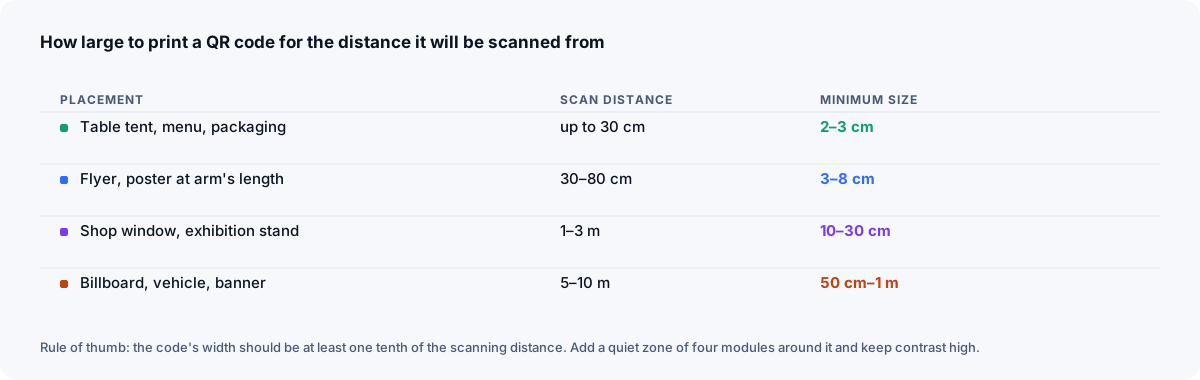
- As a starting point, around 2 cm × 2 cm for a short-link code; larger for anything scanned from more than arm's length.
- Keep a quiet zone — blank margin — of at least four modules on all four sides. Designers routinely crop it to fit a layout, and the code stops scanning.
- Print dark on light. Inverted and low-contrast codes fail on many scanners.
- Print the short link as text next to the code for people who cannot or will not scan.
The print guide covers placement, surfaces and error correction in full.
Frequently asked questions
- How do I get a QR code for a URL?
- Shorten the URL while signed in, then click the QR code icon on the link in your dashboard. The code is generated instantly and can be downloaded as SVG or PNG.
- Why put a short link in a QR code instead of the full URL?
- Shorter text produces a simpler code with fewer modules, which scans faster and survives printing at small sizes. And because the short link is editable, you can change where the printed code goes without reprinting it.
- Does the QR code expire?
- Only if the link behind it does. A QR code is just the link encoded as an image; as long as the short link works, so does the code.
- Can I track scans of a QR code?
- Yes, as visits through its short link. A visit is counted when the phone opens the link the code holds, and it appears in the link's analytics with the time, country and device. A camera that recognises the code without opening it counts nothing, and anyone who types the same short link is counted too — so give each code its own link.