Product
Expiring links: short URLs with a built-in end date
Most links are meant to last. Some are not — a flash sale, a meeting invite, a file you are sharing for a day. An expiring link stops working on schedule so you do not have to remember to kill it.
Setting a lifetime
Sign in, tick “Advanced options” on the homepage, and fill in “Expires in”. The field takes a plain duration, counted from the moment you shorten the link:
30mor30 minutes8hor8 hours7 days,2 weeks,90 days1yor1 year
Months are not a unit — lengths vary too much to mean one thing — so write 30 days instead. The shortest lifetime is one minute. The dashboard shows “Expires in …” next to the link so you can see what is due to disappear, and the API takes the same field when links are created from a script.
What expiry actually does
An expiring link has three stages, and only the first is visible to the people you share it with.
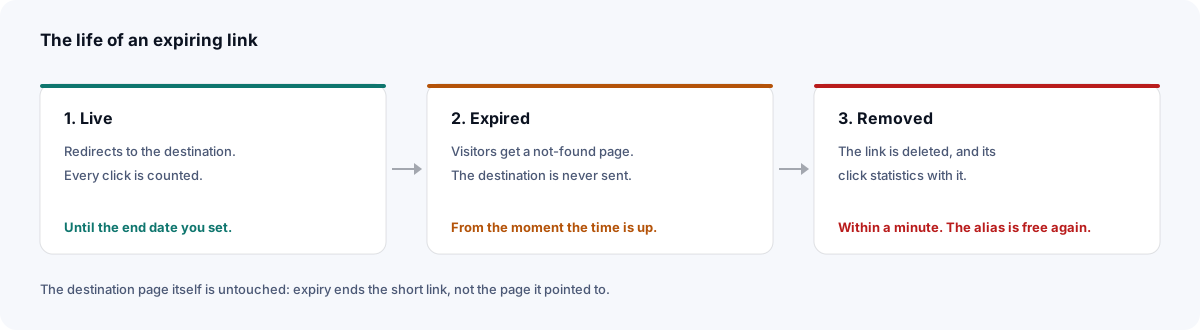
Until the end date the link behaves like any other: it redirects, and every click is counted. The instant it expires, visitors get a not-found page rather than the destination. Within the next minute a scheduled job deletes the link outright, and its click statistics go with it — expiry is a real ending, not a hidden archive. The alias is then free to be used again.
The destination itself is untouched. Expiry is about the short link, not the page it pointed to: anyone who already has the real URL can still reach it.
Where temporary links earn their keep
Time-boxed promotions
A discount link that dies with the sale means no one finds it in a forwarded email three months later and asks why the code does not work.
Choosing how long
Set the lifetime from the thing that ends, then add a margin for the people who open links late — the last reader of a newsletter is often a day or two behind the first.
| What you are sharing | A sensible lifetime |
|---|---|
| A flash sale or limited offer | The end of the offer, plus a few hours |
| A meeting or webinar link | Until the day after the event |
| A file handed to one person or team | 24h to 3 days |
| A draft or staging preview | A few hours, renewed if the review runs on |
| A seasonal campaign | The season, e.g. 90 days |
When not to use expiry
Anything printed or hard to recall — a poster, packaging, a QR code on a menu, a slide that will be shared as a PDF — outlives your plans for it. When the campaign ends, an expired link turns every copy still in the world into a dead end, and its click history goes with it. For those, keep the link and change where it points instead: send it to the next campaign, or to a page that says the offer has ended.
The same goes for the statistics. If a link's numbers matter after the campaign — for a report, or to compare with next year — read them off the stats page or pull them through the API before the end date.
Frequently asked questions
- How do I make a link expire?
- Sign in, tick 'Advanced options' on the homepage and fill in 'Expires in' with a duration such as 30m, 8h, 7 days or 2 weeks. The link stops working after that time.
- What happens when someone opens an expired link?
- They see a not-found page from the moment it expires. Within a minute the link is deleted, along with its click statistics, and its alias can be reused.
- Can I extend or remove an expiry?
- You can change it at any time while the link is live: edit it from your dashboard and enter a new lifetime, counted from when you save. An expiry can't be cleared outright, so to keep a link indefinitely give it a long one, such as 10 years.
- Do expiring links have analytics?
- Yes, recorded exactly as for any other link — until it expires. The statistics are deleted with the link, so note or export anything you want to keep before the end.