basics · how-to
How to Shorten a URL: Every Method, From Click to API
Every way to shorten a link: instantly with no account, with a custom alias, on your own domain, with a password or expiry, or in bulk with the API.
7 min read
basics · analytics
The lookup, the redirect, 301 vs 302 vs 307, where click analytics come from, why some links are slow, and what a short link can't hide.
A URL shortener does one thing: it remembers a long address under a short name and, when someone asks for the short name, sends them on to the long address. Everything else you'll meet — click counts, custom domains, passwords, QR codes — is built on top of that single lookup. Once you understand the lookup, most of what you'll ever notice about a short link stops being mysterious: why some are slow, why click numbers differ between services, why a link can be changed after it's printed, and what a short link can and cannot hide.
This guide walks through the whole path from click to destination. It's written for people who use short links — marketers, publishers, anyone who prints a QR code — rather than for people building a shortener, but it doesn't skip the mechanism, because the mechanism is where the answers are.
When you shorten https://example.com/products/spring-collection?utm_source=newsletter&utm_campaign=spring, the shortener writes that address into a database next to a key. The key is either generated — a handful of random characters such as kZHTt5 — or chosen by you, such as spring. The short link is nothing more than the shortener's domain followed by that key: xlyl.link/spring.
Later, someone taps the short link. Their browser asks the shortener's server for /spring. The server looks the key up, finds the long address stored beside it, and replies with an HTTP redirect: a response that says, in effect, "what you want is over there", and includes the long address. The browser follows it on its own. The visitor sees the destination; the short link was on screen for a few milliseconds and most people never notice it was there.
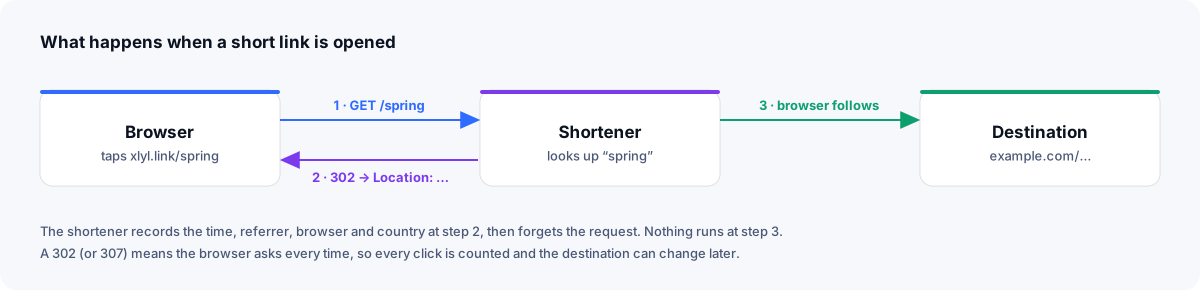
That is the entire mechanism. A URL shortener is a lookup table with a web server in front of it. Everything in the rest of this guide is a consequence of that sentence.
Two details about the key shape the rest of the product.
First, keys are unique per domain, not globally. The real lookup is domain plus key, which is why xlyl.link/spring and go.yourbrand.com/spring can point at different places, and why moving to your own domain frees up every alias you'd want.
Second, a generated key is only as good as its randomness. A shortener that hands out a1, a2, a3 in order lets anyone enumerate every link it has ever made by counting. Well-built services generate keys from a large alphabet with enough length that guessing one is impractical, and treat a custom alias as a deliberate choice to make a link findable rather than private. If a link must be private, the answer is a password on the link, not an obscure key.
HTTP has several ways to say "over there", and the choice changes how a short link behaves.
| Status | Meaning | Caching by default | Used by shorteners for |
|---|---|---|---|
| 301 Moved Permanently | The resource lives at the new address for good | Cacheable, so a browser may skip asking next time | Permanent moves where counting doesn't matter |
| 302 Found | Here it is, for now | Not cached unless the response's headers allow it | Trackable links whose destination may change |
| 307 Temporary Redirect | Like 302, but keeps the request method | Not cached unless the response's headers allow it | The same, with stricter semantics |
| 308 Permanent Redirect | Like 301, but keeps the request method | Cacheable, so a browser may skip asking next time | Rare in shorteners |
These are not conventions — they are defined in RFC 9110, the HTTP semantics specification, and MDN's redirections guide covers how browsers treat each one in practice. Caching itself is governed by RFC 9111: explicit headers such as Cache-Control and Expires can make any of these responses cacheable, or not.
Shorteners that count clicks usually use a 302 or 307 on purpose, and the reason is the caching column. If the browser cached a 301, the second click from the same person would never reach the shortener, and would never be counted. Worse, if you later changed where the link goes, that person's browser would keep sending them to the old destination until its cache expired — which can be a long time.
The status code alone doesn't guarantee that every click reaches the server, though: cache headers and anything in between (a corporate proxy, a CDN) decide that. Xlyl answers with a 302 and no Cache-Control or Expires header, so browsers and caches that follow the specification ask again on every click.
A 302 costs one extra round trip on every click, usually tens of milliseconds on a well-run service, more for a visitor far from its server. It buys two things you'll use constantly: a count of the clicks that reach the server, and the ability to change the destination later with every visitor getting the new one.
There's a search-engine angle too. Google treats a 301 or 308 as a signal that the destination is the canonical address, which is what you'd use to move a page permanently. A 302 or 307 isn't that signal on its own; Google weighs other signals as well. Xlyl's redirects also carry an X-Robots-Tag: noindex header, asking search engines not to index the short link itself. Your content's page should rank; the short link is a door to it.
Because every click passes through the shortener's server, the server can note a few things about the request before it redirects. This is the entire data source for link analytics; nothing runs on the destination page, and nothing is installed on the visitor's device.
What a request carries:
Referer header. The page the click came from — a newsletter, a social network, a search result. Browsers send only the host (or nothing) in many cases now, so referrer data is coarse: you'll see instagram.com, not the particular post.User-Agent header. The browser and operating system, from which "mobile or desktop" and "Safari or Chrome" are derived.Two consequences follow, and both are why link analytics are worth having alongside whatever runs on your website.
Link analytics work for destinations you don't control. A short link to your Amazon listing, your podcast on Spotify, a partner's registration form or a PDF on a CDN tells you how many clicks went there, from where and when — pages where you can't install anything.
Link analytics measure the click, not the visit. Someone who taps and then closes the tab before the page loads is a click but not a page view. Someone whose browser blocks your site's analytics script is a click but not a page view. So link counts are often higher than page analytics for the same traffic, but not always: your page analytics also see visitors who arrived by other routes, and count reloads and extra page views. Line up the time window, filters and definitions before comparing the two.
The moment a link is pasted into a chat app, a social network or an email client, something fetches it. Link-preview crawlers visit the URL to build the little card with a title and image. Security scanners in many corporate mail systems fetch the links in incoming messages. None of these are people.
A shortener that counts every request will report phantom clicks — sometimes several per real one on a link shared widely in chat. A shortener that filters known crawlers by their User-Agent reports lower numbers, closer to human traffic, though a crawler that presents itself as an ordinary browser still gets counted. When two services disagree about the same link, this is often why. Xlyl goes further: besides crawlers that name themselves, it leaves out requests that lack what every browser sends (a language header, the security headers a modern Chrome or Firefox adds), requests from cloud servers, prefetches and repeat clicks, and it shows each filtered click with its reason. That applies to links made with an account (links made without one aren't counted at all), and while it keeps a row for each click, the visitor's IP address is used only in memory and never written down — so there is no address in the database to leak.
A custom domain doesn't change the mechanism at all. You point go.yourbrand.com at the shortener's server with a DNS record — usually an A record holding the server's IP address, or a CNAME to the shortener's own hostname where that hostname isn't behind a proxy. When a request arrives for that hostname, the server looks the key up in the same table, scoped to your domain, and redirects exactly as it would for its own domain.
What changes is everything the visitor can see:
go.yourbrand.com/sale is available even if a thousand other people have used /sale elsewhere.The custom domain guide covers the DNS step by step; the domains page in the dashboard requests the domain live and reports what's missing, so you can see whether the domain is pointing at the right place before anyone clicks.
Anything that happens between the lookup and the redirect is a feature. Three common ones:
Password protection. Instead of redirecting, the server shows a form. Only when the submitted password matches does it redirect. This is real protection — the destination is never sent to the browser until the password is right — which is not true of an "obscure" link, whose destination is one preview away. Password-protected links suit previews, drafts and anything you'd rather not have forwarded.
Expiry. A timestamp on the stored record. Once it passes, the lookup behaves as though the link never existed, and the visitor gets a not-found page. Expiring links are the right tool for time-boxed offers, event registration and download links you don't want circulating forever.
Preview. Adding + to the end of an Xlyl link returns a page showing the destination instead of redirecting to it, except for a password-protected link, whose destination stays hidden. It's the quickest way to check where a short link goes before you follow it, and it's what a careful reader should do with any short link from someone they don't know.
If the lookup is a database query on every click, a busy shortener is doing a great many queries. Fast services keep their popular links in memory — a cache in front of the database — so the common case never touches disk. Xlyl uses Redis for this; a link that's being clicked a hundred times a minute is served from memory, and each click is written to the database afterwards by a background job, off the redirect path.
Slow services either don't cache, or are doing extra work on the redirect path. The usual suspects:
If a short link takes a visible moment to resolve, one of those is usually why, and it's worth knowing before you put the link on a billboard. A free shortener with no interstitial is a different product from one that shows ads on the way through.
For an ordinary link, the destination is in the redirect response, so anyone who looks can see it before visiting: with a preview feature, with the browser's network inspector, or with a one-line command. curl -I xlyl.link/spring prints the response headers, including the Location line that holds the next address (for a direct redirect like Xlyl's, the long address), without following it. A password-protected link is the exception by design: its Location points at the password form, and neither that nor the preview reveals the destination until the password is right.
This is the right way round. Short links obscure the destination from a glance; they don't conceal it from anyone who checks. That's what makes short links reasonable to use as a reader — you can usually find out where one goes — without making them a useful tool for hiding things. A service where no link can be checked is worth being suspicious of; a service whose links are routinely used for abuse gets its domain blocked by browsers and mail filters, and every honest link on it suffers. The guide to checking short links goes into the practical side.
A QR code is a short link printed as a pattern. The scanner reads the pattern, gets the URL, and the phone opens it — after which everything above applies: lookup, redirect, and a count if the link belongs to an account. Encoding the short link rather than the destination is what makes a printed code editable: the pattern never changes, but where it goes can. The QR guide covers sizing and placement; the mechanism is the one you've just read.
Store a long address under a short key. Redirect requests for the key to the address. Note what you can about the request on the way through. Every URL shortener is that, and everything that distinguishes one from another is a decision layered on top: what it stores (your domain or theirs), what it counts (every request, or clicks with known bots filtered out), what it shows on the way (nothing, or an ad), whether the destination can be changed later, and whether anyone can check where a link goes before they go there.
If you'd like to see the mechanism from the other side, sign in and shorten a link — accounts are free, and statistics need one — then open its statistics page. The chart you'll see is the lookup, counted.
basics · how-to
Every way to shorten a link: instantly with no account, with a custom alias, on your own domain, with a password or expiry, or in bulk with the API.
· 7 min read
marketing · analytics
Which UTM parameters to use, how short links tidy the tags away, why one link per channel is the rule, and how to read link and site analytics together.
· 8 min read
security · basics
Four checks to run on a short link before you click, the warning signs of a deceptive link, and how to share links people will trust.
· 8 min read