affiliate · marketing
Short Links for Affiliate Marketing: A Practical Guide
How affiliates tidy long tracking URLs, measure which placement earns, re-point links when a program changes, and stay within disclosure rules.
8 min read
marketing · analytics
Which UTM parameters to use, how short links tidy the tags away, why one link per channel is the rule, and how to read link and site analytics together.
Campaign tracking has one job: to tell you, after the fact, which of the things you did brought people in. It's usually done badly not because it's hard but because it's tedious — long tagged URLs that get pasted wrong, half the team using Email and half using email, a spreadsheet nobody updates. Short links fix the tedious part. The tags live inside the link once, the reader sees a clean address, and every placement gets its own count without anyone touching a spreadsheet.
This guide is the setup end to end: the parameters, the naming rules that keep reports clean, the one-link-per-channel discipline, and how to read link analytics alongside your site analytics without arguing about which number is right.
UTM parameters are five optional fields you add to the end of a URL so that the destination's analytics tool can record where the visit came from. They were named for the Urchin Tracking Module, the software Google Analytics grew out of, and every mainstream analytics tool reads them. Google documents how it reads each one in its campaign collection reference, and its Campaign URL Builder will assemble a tagged URL for you if you would rather not type them by hand. They do nothing on the page itself; they're labels the page's analytics script picks up from the address bar.
| Parameter | Answers | Examples |
|---|---|---|
utm_source |
Where, specifically? | newsletter, instagram, partner-blog |
utm_medium |
What kind of channel? | email, social, print, paid |
utm_campaign |
Which push? | spring-2026, launch, black-friday |
utm_content |
Which variant within the push? | hero-button, footer-link, story-1 |
utm_term |
Which keyword? (paid search) | url-shortener |
Use the first three always. Use utm_content when one placement has several links you want to tell apart. Leave utm_term to paid search.
A properly tagged URL looks like this:
https://example.com/spring?utm_source=newsletter&utm_medium=email&utm_campaign=spring-2026
It's correct and it's unusable. It crowds a post or a caption (X at least counts every link as 23 characters; most places show every one), it looks like a tracking device (because it is one), it breaks when someone types it from print, and it invites the person pasting it to "tidy" the end off. Every one of those failure modes shows up in your report as visits with no source.
A short link in front of it solves all of them at once:
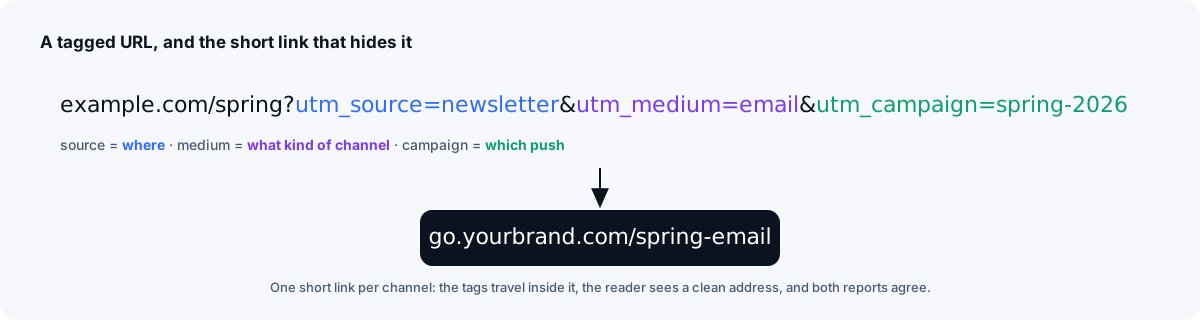
The tags travel inside the short link. The reader sees go.yourbrand.com/spring-email wherever it's shared; once they arrive, the destination's address bar shows the full tagged URL, and anyone who checks where the link redirects can see the tags too. When they click, the shortener redirects to the full tagged URL, your site analytics record the source, and the shortener records the click. Nobody pastes the wrong thing because there's nothing long to paste.
Two further advantages that only appear once you're using them:
This is the whole method. Every place a link appears gets its own short link. Same destination, same campaign, different link for the newsletter, the Instagram bio, the story sticker, the printed flyer, the sales deck, the partner's blog.
The reason is that a click count is only useful if you know what it's a count of. One link shared everywhere tells you "300 clicks"; one link per placement tells you "220 came from the newsletter, 60 from Instagram, 20 typed it from the flyer" — and the flyer has been up for a month, so you now know what it's worth.
It costs nothing except the discipline to make the extra links, and a naming convention that makes them easy to tell apart: /spring-email, /spring-ig, /spring-print, /spring-deck.
Each placement's short link carries tags that describe that placement:
| Placement | Short link | utm_source |
utm_medium |
utm_content |
|---|---|---|---|---|
| Newsletter, hero button | /spring-email |
newsletter |
email |
hero |
| Newsletter, footer | /spring-email-footer |
newsletter |
email |
footer |
| Instagram bio | /spring-ig |
instagram |
social |
bio |
| Printed flyer (QR) | /spring-print |
flyer |
print |
qr |
| Partner's blog post | /spring-partner |
partner-blog |
referral |
— |
The short link's own analytics will show the referrer for free — instagram.com, your newsletter tool's domain — but referrers are coarse and often missing (print has none; many apps strip them). The UTM tags are what survive all the way to your site's report.
Analytics tools group visits by the exact string in each parameter. Every inconsistency becomes a separate row, and the campaign that "didn't work" often did — it's just split across four spellings.
email, never Email.spring-2026, never spring 2026 or spring_2026.spring-2026 will still be clear next April; promo-3 won't.Because the tags live inside short links, you write each one once. The convention only has to be applied when a link is created, and the description field on the link is the place to note which values it carries.
You'll now have two numbers for every placement: clicks on the short link, and sessions with that source in your site analytics. They will not match, and that's fine once you know what each measures.
A click is counted when the shortener serves the redirect — the instant the tap happens, before the destination has loaded, before any script runs. Link analytics also work for destinations you don't control, so a short link to a partner's page or an app store listing gives you a count you'd otherwise never have.
A session is counted when the destination's analytics script runs — after the page loads, and only if nothing blocked it.
So the two rarely match, and neither is wrong. Clicks usually run higher: some visitors bounce before the page loads, block scripts, or give up on a slow connection. Sessions can run higher too: a visitor who comes back later can start another session credited to the same campaign, and someone who copies the tagged address from their address bar shares the tags without the short link. Line up the time window and filters before comparing. Then use them like this:
Both numbers are yours; the argument about which is "right" is a category error.
On Xlyl's statistics page each link has its clicks by hour and by day, its referrers, countries, browsers and operating systems, and a total for the last day, week, month and all time. For a campaign, the useful views are the per-day chart (did the newsletter spike on send day and decay, or keep going?) and the country and device breakdowns (is the print audience local and on phones, as you'd expect?). Known bot traffic — link previews, mail scanners that identify themselves — is filtered by user agent before counting, so the numbers are closer to people than a raw count. Statistics need an account: links made without one aren't counted. Visitor IP addresses are never stored.
/[campaign]-[placement].If you'd rather automate steps 3 and 4 for a spreadsheet of placements, the API creates links from a script, tags and all.
affiliate · marketing
How affiliates tidy long tracking URLs, measure which placement earns, re-point links when a program changes, and stay within disclosure rules.
· 8 min read
social · marketing
How Instagram, X, TikTok, LinkedIn, YouTube and WhatsApp treat links, what a branded link tells readers, and how to run a link-in-bio on your domain.
· 7 min read
qr · marketing
Where QR codes get scanned, how large to print them for the distance, why the code should hold a short link, and how to measure visits per placement.
· 8 min read