Comparison
A TinyURL alternative that tells you what happened
TinyURL solved one problem extremely well in 2002 and has barely needed to change since: paste a link, get a short one, no account, no ceremony. What its free plan does not give you is a link that carries your name, a link you can change later, or any idea who clicked; TinyURL keeps those for its paid plans. That gap is what this page is about.
Last updated
What TinyURL gets right
It is worth being clear about why TinyURL has outlasted most of the services that tried to replace it. It asks nothing of you: no account, no cookie banner, no onboarding. You arrive with a long link and leave with a short one, and it has been doing that for longer than most of the web has existed. Its links have a reputation for still working years later, which is precisely the property you want from something you printed.
For a one-off share — a link in a chat, a URL read aloud once, a temporary redirect for a friend — that is the whole job, and any product that makes it more complicated has made it worse. We kept that path: on the homepage you can paste a link and get a short one back without signing up for anything.
Where it runs out
The link is not yours, and does not look like you
A tinyurl.com link says TinyURL, not you. In a newsletter, a tweet or a printed flyer, the domain is the first thing a reader sees before deciding whether to click, and your own domain shows who sent the link.
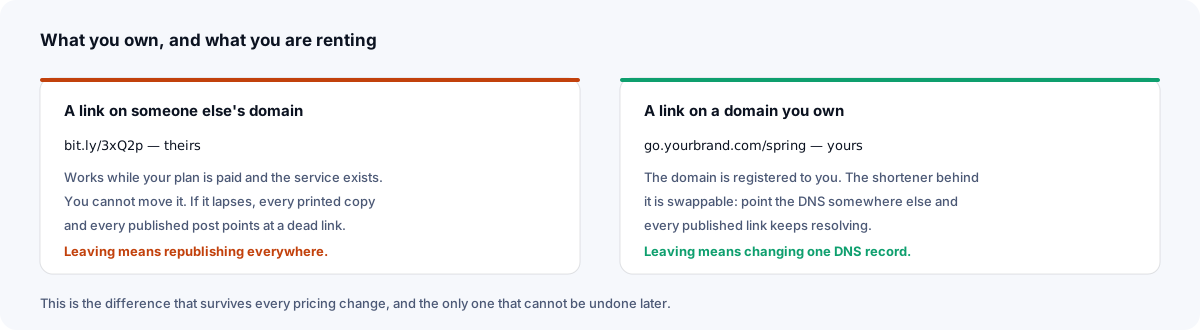
Serving links from your own domain fixes both the recognition and the ownership problem at once. On TinyURL a custom domain is a paid-plan feature; here it is included rather than being the thing you pay for.
On the free plan, you cannot change where it goes
TinyURL does offer destination editing, but only on its paid plans. This is the expensive one. A short link whose destination is fixed is only as good as the decision you made when you created it. The PDF gets a new URL, the campaign page moves, the product is discontinued — and every place you published that link is now wrong. If the link is on a printed menu or a conference banner, the fix is a reprint.
Editable destinations turn that into a thirty-second change. It is the single strongest argument for using a shortener at all, and it is the reason to make the account before the link goes to print rather than after.
On the free plan, you learn nothing from a click
TinyURL's free plan will tell you a link exists. It will not tell you whether the flyer worked, which channel actually sent people, when your audience is awake, or what they read it on; click analytics are on its paid plans. That is simply the point at which people start looking for an alternative.
Each link you make with an account has its own statistics: clicks by hour and day, referrer, country, browser and operating system, with known link-preview crawlers and mail scanners filtered out by their browser string before counting. Visitor IP addresses are never stored — the detail is per click, not per link, not a visitor log.
The cost of a link you cannot change
The argument for editable destinations sounds abstract until you price it out, so here it is priced out. These are the situations where the difference between a fixed link and a changeable one is measured in money rather than convenience.
Anything printed
A QR code on packaging, a table card, a conference banner, a vehicle livery. The code encodes a URL; the print run is committed. If that URL has to change — the campaign page moves, the PDF is replaced, the product is renamed — a fixed link means reprinting, and reprinting a run of packaging costs several orders of magnitude more than the shortener ever would.
Encode a short link you control and the pattern on the packaging never has to change again. The QR guide covers sizing and placement; the editability is the part that protects the print budget.
Anything with a long tail
A video description from three years ago. A blog post that still ranks. A slide deck that circulates. These keep sending people long after you have forgotten writing them, and they are exactly the places you cannot edit in bulk. A link you can repoint turns a dead end into a redirect; a fixed one turns it into a 404 with your name on it.
Anything you got slightly wrong
The most common case, and the least dramatic: the link went out with a typo in the campaign parameter, or pointing at the staging URL, or missing the anchor that jumps to the right section. Fixing that in the shortener takes seconds. Without it, you are sending a correction email to everyone who already got it.
None of this argues for a complicated tool. It argues for making the link somewhere you can reach it later, which costs one account and no money. What a link can carry lists the rest of the options that become available at the same moment.
Side by side
| Capability | TinyURL | Xlyl |
|---|---|---|
| Shorten without an account | Yes — its defining feature | Yes |
| Choose the ending | Yes, on its own domain | Yes, on its domain or yours |
| Your own domain | On paid plans | Included |
| Edit the destination later | On paid plans | Included, any time |
| Click analytics | On paid plans | Per-link breakdown with an account, known bots filtered |
| Password protection | On paid plans | Included |
| Expiring links | Offered; check TinyURL's pricing page for which plans | Included |
| QR codes | Yes | Included |
| API | Yes; check TinyURL's pricing page for which plans | Included |
| Paid tier | Yes, for the paid features above | None: one free tier with anti-abuse limits |
TinyURL's plans change; verify anything you intend to rely on against their current pricing page rather than this table.
Moving across
There is usually nothing to migrate, which is the upside of how TinyURL is typically used — links made one at a time, for a purpose, and rarely inventoried.
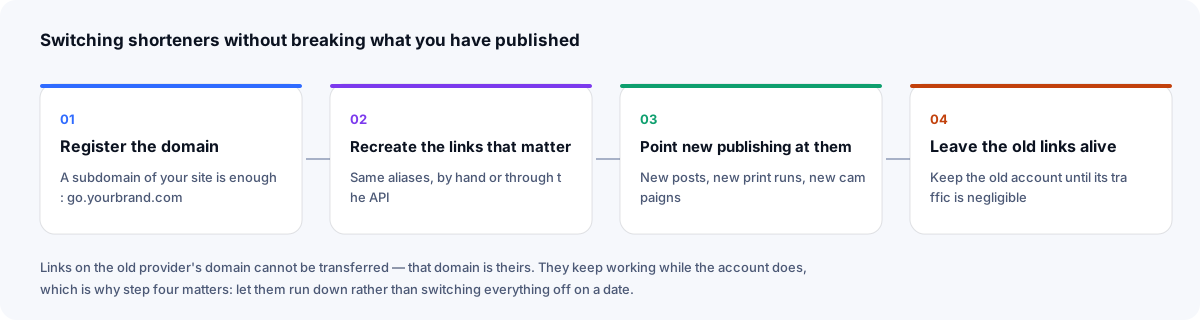
Add your domain on the domains page, start making new links on it, and leave the existing tinyurl.com links alone — they keep working, and they cannot be redirected to yours because that domain is not yours to point. If a handful of old ones are genuinely important, recreate them under new aliases and update the places you control.
Who should stay with TinyURL
If your use is genuinely one-off — you want a short link, you will send it once, and you will never need to know what happened to it — TinyURL does that with very little friction, and there is no reason to change. Its whole design is a refusal to make you care, which is a real feature.
The moment a link goes on something you cannot easily reprint, or the moment someone asks how it performed, you have left the problem TinyURL's free plan solves, and the choice is between its paid plans and a free tool like this one. The guide to shortening a URL walks through each method from a no-account paste to the API, and the comparison framework covers how to judge any shortener on the things that do not change.
Sources
- TinyURL: what is included in the free plan — no analytics, editing or custom domain; links do not expire
- TinyURL: how to edit a destination URL — editing is a paid-plan feature
- TinyURL: Twitter link shortener — expiry dates, and password protection on a paid plan
- TinyURL plans and pricing
Checked 23 September 2026.
Frequently asked questions
- Is there a TinyURL alternative with analytics?
- Yes. Every link you make with an account has its own statistics page — clicks by hour and day, referrer, country, browser and operating system — with known bots filtered before counting and no visitor IP addresses stored. It is included rather than being a paid add-on; on TinyURL, click analytics are on its paid plans.
- Can I use my own domain instead of tinyurl.com?
- Yes, on the free tier. Point a domain or subdomain at the server with one DNS record and every link you make can live on it, which is what turns a short link into something recognisably yours.
- Do TinyURL links expire?
- TinyURL says its links do not expire, which is much of its appeal. It also offers an optional expiry date you can set on a link; check TinyURL's pricing page for which plans include it. Any shortener's links last as long as the service and the account behind them, which is why a link on a domain you own is the safer choice: you can recreate it on another service and keep the same address.
- Can I shorten a link without making an account?
- Yes — paste a URL on the homepage and you get a short link back immediately, no sign-up. An account is what adds a chosen ending, your own domain, editing and statistics.
- Can I edit where a TinyURL points after sharing it?
- Yes, on TinyURL's paid plans: it describes editing the destination as a premium feature that free accounts do not have. Here it is a standard part of every link you make with an account, which is the difference between reprinting a flyer and changing one field.