Product
Using a URL shortener with your own custom domain
A short link on your own domain shows people who sent it before they decide to trust it. Here is how to point your own domain at your links.
Why a branded domain matters
A generic shortened link hides its destination. Recipients have learned to be wary of them, and some corporate mail filters treat unknown shortener domains as a spam signal. A link on your own domain carries the trust your brand already has, and keeps that recognition in every place the link is shared.
It also means you own the addresses. If you ever move to a different shortener, you can recreate your links there — each alias and its destination — move the domain's DNS and HTTPS to it, and the addresses you have published keep working.
What you need
- A domain or subdomain you control — a subdomain such as
go.yourbrand.comis the usual choice - Access to that domain's DNS settings
- A Xlyl account — sign up here
Subdomain or whole domain
Two shapes cover almost everyone, and both take the same single A record. Use a subdomain unless the whole domain exists to be the short domain.
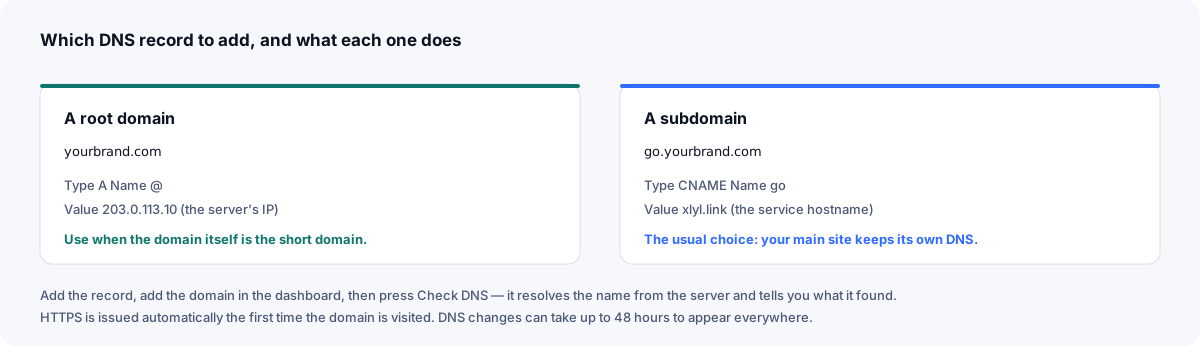
A subdomain is the usual choice because it leaves your main website's DNS untouched: go.yourbrand.com or l.yourbrand.com points here while yourbrand.com carries on exactly as it did. A dedicated short domain is shorter still, at the cost of another registration.
Setting it up
1. Point the DNS record
In your DNS provider, create an A record for the subdomain you want to use, pointing at 104.207.76.203.
| Type | Name | Value |
|---|---|---|
| A | go | 104.207.76.203 |
Use @ as the name instead of go if you are pointing an entire root domain rather than a subdomain.
If your DNS is on Cloudflare, DNS only (the grey cloud) is simplest. A proxied record works too, as long as it still points at this server's address; pointed anywhere else, requests for your links never reach this server.
2. Add the domain to your account
Open Domains and enter the domain. You can optionally set a homepage — where someone is sent if they visit the bare domain with no link code after it. Leave it blank and they are redirected to Xlyl.
Troubleshooting
The domain shows a certificate warning
HTTPS for a custom domain needs a certificate covering that domain, and on Xlyl an administrator issues it once DNS points here. Until then browsers show a warning. Press Check domain: if DNS is right and the certificate is the only thing missing, it is waiting to be issued — if it stays that way, write to contact@xlyl.link.
Checking it worked
The domains page lists the record to set, and every connected domain has a Check domain button. It requests the domain from the server and reports what it found: working, a certificate still missing, DNS pointing elsewhere, a Cloudflare proxy in the way, or no records yet. The last result stays on the page.
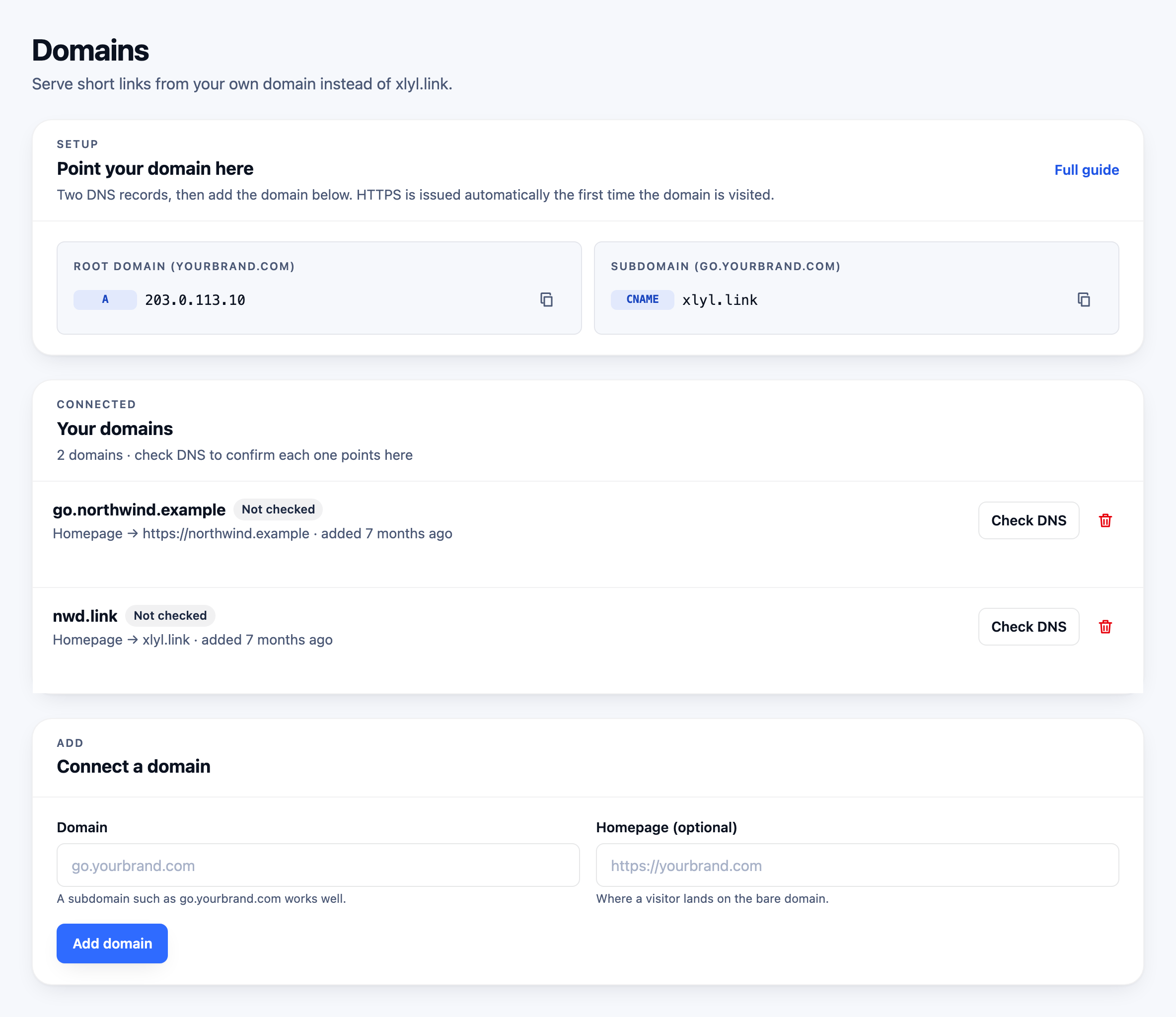
This matters because DNS is the step people get wrong and the step with the slowest feedback: a typo can take hours to become obvious. Checking from the server, rather than trusting your own machine, rules out a local resolver cache telling you what you want to hear. Propagation can take up to 48 hours, so an empty result immediately after a change is normal.
After the domain is live
Choose it in the advanced options when you shorten a link, and the link is created on it. Aliases are unique per domain, so every ending you want is available on yours even if it is taken on the shared domain — which is the moment to agree a naming convention rather than after the first hundred links.
From here, the rest follows: clicks are counted per link, QR codes encode the branded link so printed codes stay valid, and the API can create links on the domain from a script. If you later move to another service, the domain moves with you, and once the links are recreated there the addresses do too — which is the argument for owning it in the first place.
Frequently asked questions
- Do I need to buy a new domain?
- No. A subdomain of a domain you already own works, and is what most people use — for example go.yourbrand.com or link.yourbrand.com. That keeps your main domain untouched.
- Can I use more than one custom domain?
- Yes. You can add several domains to one account and choose which one a link uses when you create it.
- What happens to links on my old domain?
- Nothing — they keep working. Adding a custom domain does not move or rewrite links you already created.
- Does a custom domain change my analytics?
- No. Clicks are tracked per link regardless of which domain serves it, so your statistics are unaffected.