basics · how-to
How to Shorten a URL: Every Method, From Click to API
Every way to shorten a link: instantly with no account, with a custom alias, on your own domain, with a password or expiry, or in bulk with the API.
7 min read
security · basics
Four checks to run on a short link before you click, the warning signs of a deceptive link, and how to share links people will trust.
Short links have a reputation problem that they mostly don't deserve. The mechanism is harmless: an ordinary short link is a redirect, and a redirect can't do anything a full link couldn't. But short links do hide the destination from a casual glance, and people who send you somewhere you wouldn't choose to go find that useful. So the honest answer to "are short links safe?" is: the link is as safe as its destination, and for most short links you can find out the destination before you go there. This guide shows you how, explains what a responsible shortener does to keep its links trustworthy, and — if you're the one sharing links — how to make yours the kind people click without hesitating.
A short link is an address on a shortening service that stands in for a longer one. When you open it, the service's server looks up the long address and replies with an HTTP redirect, and your browser follows it. The full mechanism is a lookup and a redirect, and nothing else: no code runs, no file downloads, nothing is installed. Whatever happens next happens on the destination page, exactly as it would if you'd been given the long address directly.
That framing matters because it separates two different worries:
Everything below is about the second question.
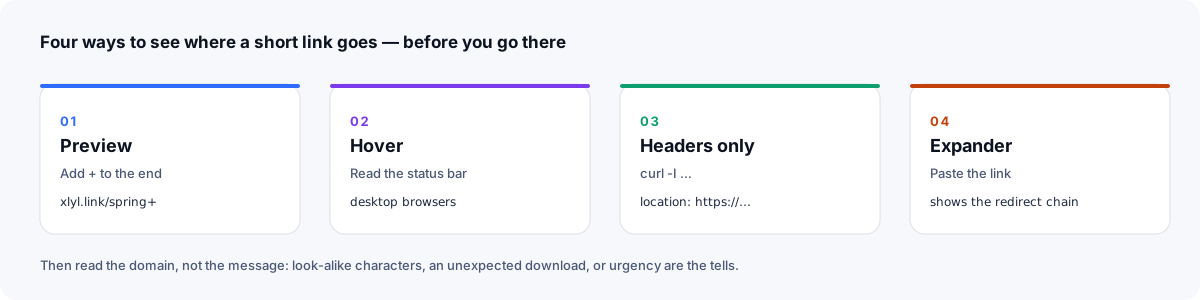
You rarely have to click a short link blind. In rough order of convenience:
Many services will show you the destination instead of sending you there if you ask. On Xlyl, add a plus sign to the end of any link: xlyl.link/spring+ opens a page that displays the long address, and nothing else. Other services use a similar trick — a trailing +, a -, or a /preview path. If a service offers no way to preview, that's worth noticing.
Two limits. A password-protected Xlyl link is the exception: its preview goes to the password form, and the destination isn't shown to anyone without the password. And a preview shows where a link points right now, not whether that page is safe; the owner can change the destination later.
Hover over a link without clicking and look at the bottom-left corner of the window. Browsers show the address the link points to. For a short link this only shows the short address — but it will reveal whether the visible text and the real link disagree, which is the oldest trick in phishing: text that says yourbank.com on a link that goes somewhere else. Hovering can't tell you where a short link finally redirects.
If you're comfortable with a terminal, curl -I fetches the response headers without following the redirect:
curl -I https://xlyl.link/spring
HTTP/2 302
location: https://example.com/products/spring-collection?utm_source=newsletter
The location line is the address the server sends you to next. For a direct redirect like this one, that's the destination; if the link bounces through more than one service, it's only the first hop. It won't help with a password-protected link (Xlyl's location points at its /protected/… password page), with services that send a page that redirects by script rather than a redirect response, or with servers that don't answer header-only requests.
Several websites expand short links for you: paste the short address, they fetch the headers and show you where it leads. They're convenient on a phone, where hovering isn't possible. Prefer one that shows the full chain of redirects, since a link can bounce through more than one service on the way.
Seeing the address is half the job; reading it is the other half. The things that should make you stop:
// up to the next /, ? or #; if that contains an @, drop everything up to and including it; drop any :port at the end. So https://trusted.example.attacker.test/login is on attacker.test (trusted.example is only a subdomain of it there), and https://trusted.example@attacker.test/login is on attacker.test too, because everything before the @ is a user name, not the host.rn for m, a capital I for a lowercase l, an accented letter in a domain that should have none. Phishing domains are built to survive a glance..exe, .apk, .zip, .scr — and you weren't expecting one, don't.None of these are unique to short links. They're the checks you'd apply to any link; short links just make it more important to look.
You can only check links you're sent. The rest of the safety picture is what the shortening service does so that its links aren't used against people in the first place. It's worth knowing, because it's what separates a service worth using from one whose domain will eventually be blocked by browsers and mail filters — taking every honest link with it.
It lets you preview. A service that offers no way to see a destination (other than for links its owners have password-protected) is asking for trust it hasn't earned.
It moderates. Abusive links get reported and removed; the accounts and destination hosts behind them get banned. Xlyl has a report page for exactly this, and administrators can ban a link, its destination host, or an account with a click.
It checks destinations. Known malware and phishing hosts should be refused at creation time, usually against a reputation list such as Google Safe Browsing, which is the same data your browser already uses to warn you. This is imperfect — lists lag reality — but it removes the low-effort abuse that makes up most of the volume.
It doesn't add its own risk. No advertising interstitial between click and destination, because interstitials are where malvertising lives. A free shortener with no ads is safer for your readers than one that pays its bills by putting a page in front of them.
It doesn't keep what it doesn't need. A visitor log with IP addresses is a liability waiting for a breach. Xlyl records each click's time, approximate location, device and source, but never stores visitor IPs.
Everything so far is about reading links. If you send them — in newsletters, on social media, in print — the question flips: how do you make your short links the kind people click without hesitating?
go.yourbrand.com/spring tells the reader who sent it before they've read the rest. A generic shortener domain tells them nothing, and if that domain has ever been used for spam, it may tell them something worse. A custom domain puts your name on every link, and it takes one DNS record.
If the visible text is a URL, make it the URL the link goes to. If it's a phrase — "Register for the webinar" — that's fine, as long as the destination is a registration page. The pattern that trains people to distrust links is text that says one thing and a link that goes to another.
In email and on social, a short link next to a plain description — "Our September menu (PDF)" — tells the reader what to expect before they tap, and gives them what a preview would. This is also good link naming practice: go.cafe.com/menu says more than go.cafe.com/x7Fq2.
A random key is not a password. If a document, a recording or a preview shouldn't be forwarded, put a password on the link; the destination is never sent to the browser until the password is right. If it should stop working after the event, give it an expiry.
Your short domain should serve HTTPS (Xlyl serves custom domains over HTTPS once their certificate is issued), and so should the destination. A browser warning between the click and your page costs you the visitor.
When you paste a link into a chat app or a social post, the app fetches it to build the preview card. Two consequences:
+ on Xlyl, except for password-protected links), curl -I for the next address, or an expander for the chain. Hovering shows whether the text matches the link.basics · how-to
Every way to shorten a link: instantly with no account, with a custom alias, on your own domain, with a password or expiry, or in bulk with the API.
· 7 min read
basics · analytics
The lookup, the redirect, 301 vs 302 vs 307, where click analytics come from, why some links are slow, and what a short link can't hide.
· 12 min read
affiliate · marketing
How affiliates tidy long tracking URLs, measure which placement earns, re-point links when a program changes, and stay within disclosure rules.
· 8 min read