Comparison
URL shortener comparison: what actually differs
Every shortener turns a long link into a short one. They differ on what happens next — who owns the link, what it costs to keep it, what you learn from a click, and whether you can leave. This page is the framework; the three below apply it to the products people compare us against.
Last updated
Why people replace a shortener
Almost nobody shops for a URL shortener. They pick one in a hurry, use it for a year, and then hit something. In our experience the something is nearly always one of five things, and which one it is tells you what to compare.
The free tier ran out
Commercial shorteners are freemium, and the free tier is a sampler. The cap is usually a number of links per month rather than a number of clicks, which means the bill arrives not when you get popular but when you get organised — the month you decide to make one link per placement instead of one per campaign.
The custom domain turned out to be the paid feature
This is the most common trigger. Branded links are the reason to use a shortener at all for most businesses, and on most commercial products they are the reason the paid tier exists. See what connecting a domain actually involves — it is one DNS record, which is worth knowing before you pay a monthly fee for it.
A link needed to change and could not
A printed QR code points at the wrong page. A campaign URL gains a parameter. If editing the destination is on a higher tier, you are choosing between an upgrade and a reprint. Editable destinations are the single most useful thing a shortener does and the easiest one to overlook while choosing.
The numbers stopped being believable
Click counts that include every link-preview crawler and mail scanner are inflated, sometimes by several times on a link shared in chat. If a service does not say whether it filters bots, assume it does not. Where click analytics come from explains why the same link can show wildly different numbers on two services.
Someone asked where the data lives
Usually a security review, a procurement form or a privacy question from a customer. At that point you need to know what is retained per visit, for how long, and in which jurisdiction — and whether you can export your links and click data if the answer is not good enough.
The difference that outlasts all the others
Price changes. Feature sets change. Companies get acquired and re-tier their plans. One decision you make at the start cannot be revisited afterwards, and it is the one people think about least: whose domain your links are on.
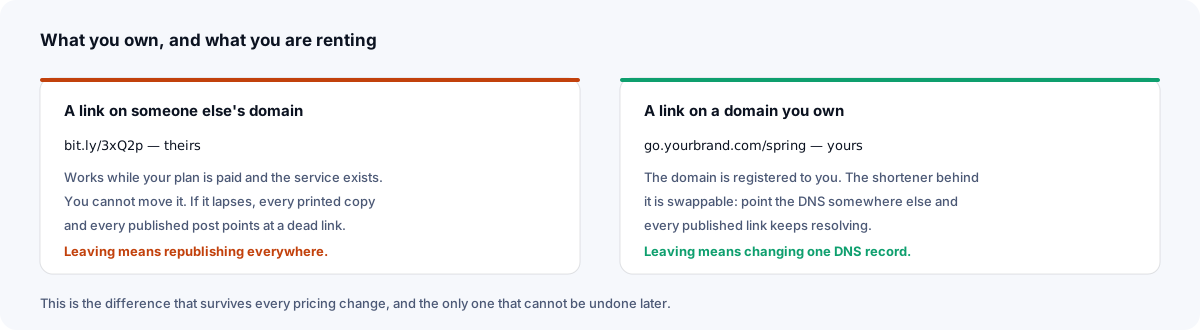
A link on a shared provider domain is a tenancy. It resolves on the provider's terms and for as long as the company exists. Every one you print, post or embed is a bet on both. When either turns against you, the link goes with it — and the cost lands wherever you published it, which by then is everywhere.
A link on a domain you registered is yours in the sense that matters: the shortener behind it is a replaceable part. If the service disappoints you in three years, you recreate the aliases on something else, point the DNS at it, and every business card, billboard and old newsletter keeps working. That is the whole argument for a custom short domain, and it is worth more than any feature on any comparison table.
How to evaluate any shortener in ten minutes
Pricing pages are written to be skimmed in the direction that flatters them. Read one backwards — start with the exit, then the cap, then the features.
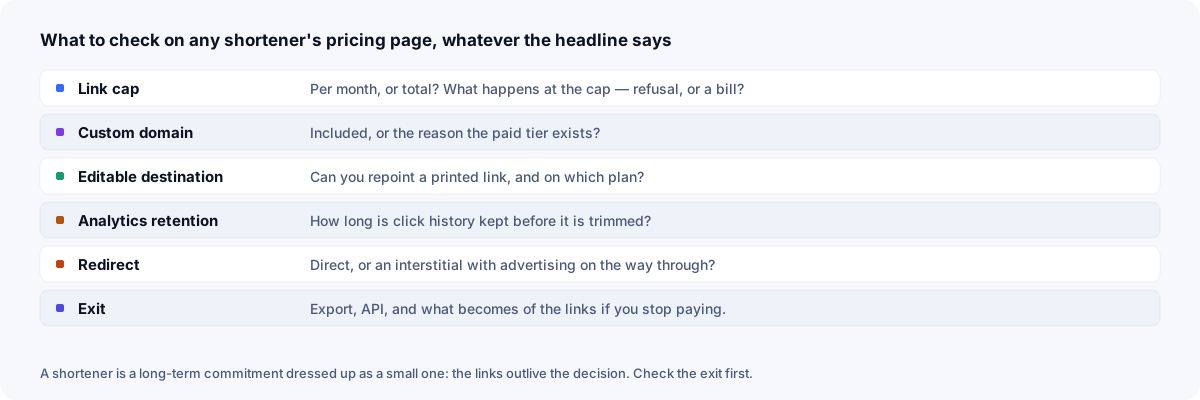
Two of those deserve more than a glance. Analytics retention is the quiet one: some services keep full click history only for the current plan period and trim older data, so the year-on-year comparison you wanted is not there when you look for it. And redirect behaviour is the one your readers experience — anything between the click and the destination costs you some of them, which is why a free shortener with no interstitial is a different product from a free shortener with one.
The two models, side by side
Rather than compare plans that will have changed by the time you read this, compare the models. Nearly every shortener is one of these two, and the differences below are structural rather than promotional.
| What matters | Commercial freemium | Xlyl |
|---|---|---|
| Pricing | Free tier, then monthly per seat or per volume | One tier, free, with anti-abuse limits only |
| Custom domain | Typically the reason the paid tier exists | Included; one DNS record |
| Editing a destination | Often a paid feature | Included, any time |
| Analytics | Depth and retention scale with the plan | Per-link breakdown with an account, known bots filtered |
| What a visitor sees | Direct on paid tiers; varies on free ones | Direct redirect, never an interstitial |
| Visitor data kept | Varies; check the provider's privacy policy | Per-click detail; visitor IPs never stored |
| If you stop paying | Varies by provider: Bitly keeps bit.ly links working after a downgrade | Nothing to stop paying |
| Taking your data with you | Varies by provider | CSV of your links; each link's clicks as CSV |
| Support, SSO, audit logs | Yes, on higher tiers | No |
Plan specifics change often and vary by region and contract. Treat the middle column as the shape of the category and verify the details on the vendor's own pricing page before deciding.
Where this one sits, including what it lacks
Xlyl is free on a single tier, serves links from your own domain, redirects directly, records per-link analytics for account links with known bots filtered and no visitor IPs stored, offers an API, and lets you export your links and each link's clicks as CSV.
What it does not have, stated plainly: no paid support organisation or response-time commitment, no single sign-on, no audit logs, no team roles or shared workspaces, and none of the integrations that plug a shortener into a marketing suite. It is one person or one team's tool, not a procurement-approved platform. If your requirement list includes an SLA, this is the wrong product and the comparison pages below say so in each case.
Switching without breaking what you published
The migration people fear is the one they never have to do. You do not move links; you stop creating new ones on the old service and let the old ones run down.
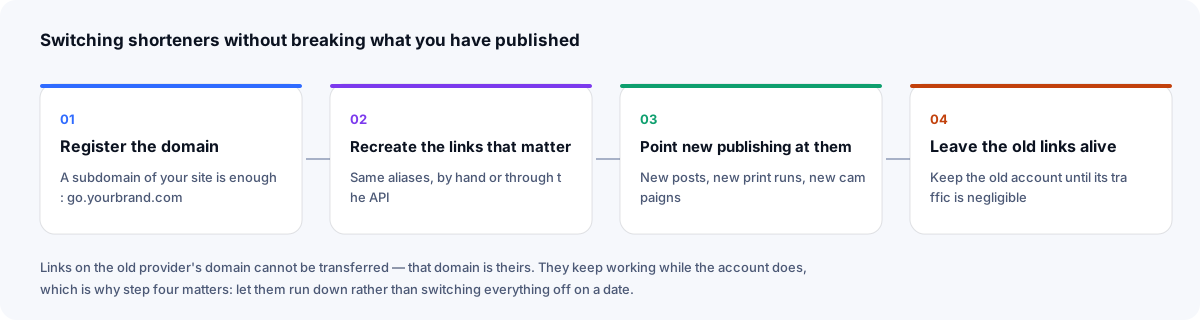
The only genuinely lost thing is a link on the old provider's shared domain, because you cannot redirect a domain you do not own. What happens to those depends on the provider's terms — Bitly, for one, keeps bit.ly links working after a downgrade — which is the argument for keeping the old account open at its free tier for a while rather than closing it on a date. Links on your own domain keep their addresses once you recreate them on the new service and change one DNS record.
If you have hundreds of links worth recreating, the API does it from a spreadsheet in a few lines, and a naming convention is worth settling before you start rather than after.
The individual comparisons
Each of these is written the same way: what the product is genuinely good at first, then where the two differ structurally, then who should stay where they are.
- Bitly alternative — The incumbent. Mature, integrated everywhere, and the one people leave when a custom domain turns out to be a paid feature.
- TinyURL alternative — The one that needs no account. Simple and long-lived, but its free plan gives you nothing back about a click.
- Rebrandly alternative — Branded links as the whole product, built for teams — and priced for them.
Sources
- Bitly: what happens when I downgrade to a lower subscription plan? — what happens to bit.ly, complimentary-domain and custom-domain links
- Google Search Central: redirects and Google Search — permanent and temporary redirects as canonical signals
Checked 23 September 2026.
Frequently asked questions
- What is the best free URL shortener?
- The one whose free tier includes the thing you actually need. For most people that is a custom domain and the ability to edit a link after sharing it, because those two decide whether the link is yours and whether a mistake is recoverable. Compare free tiers on those two first and the field narrows quickly.
- Can I move my existing short links to another service?
- Links on your own domain, yes — recreate the aliases on the new service, then change one DNS record, and the addresses you recreate keep working. Links on a provider's shared domain, no. That domain belongs to them, so what happens to those links depends on that provider's terms.
- Is a free URL shortener safe to use for business?
- It depends on two things: whether it shows an interstitial or advertising between the click and your page, and whether it moderates abuse well enough that its domain has not been blocked by browsers and mail filters. Serving links from your own domain means that reputation is yours rather than shared with everyone else using the service.
- What happens to my short links if I stop paying?
- It varies by provider, so check before you rely on it. Bitly, for example, says bit.ly links keep working after a downgrade, links on a complimentary domain stop when that domain's registration expires, and custom-domain links keep working but it stops renewing their SSL certificate. Here there is nothing to stop paying: there is one free tier.
- Do short links hurt SEO?
- Not when they redirect properly. A shortener that answers with a 301 or 302 passes the visitor straight to the destination. A 301 or 308 tells Google the destination is the canonical page; a 302, which is what links here use, does not, though Google can still weigh other signals. Interstitials, chains of redirects and links on a domain with a bad reputation are what cause problems.