Product
URL shortener with analytics: track clicks on every link you own
A short link is also a measurement point. Every click passes through it, so every click can be counted and described — which is the part of link shortening that actually earns its keep.
What is recorded for each click
- When — each click is timestamped, and the dashboard charts the last day, week, month, and all time.
- Where from — the referrer and the kind of source it is (search, social, email, another site, or direct), so you can tell a click from a newsletter apart from one on a social network or one typed directly.
- Which campaign — any UTM tags on the link, so a tagged link is attributed without opening another tool.
- Where — the country, and the region and city where they can be resolved, derived from the IP address at click time. The address is not kept.
- On what — whether it was a phone, tablet or computer, and the browser and operating system, which is how you learn that your audience is mostly on phones.
Bots are filtered before any of this is counted: crawlers and link-preview fetchers that name themselves, scripts posing as a browser, scanners running on cloud servers, prefetches, and the same visitor clicking again within 30 seconds. A link pasted into a chat app that fetches a preview does not register a phantom click, and the link's page lists what was filtered and why.
What a statistics page shows
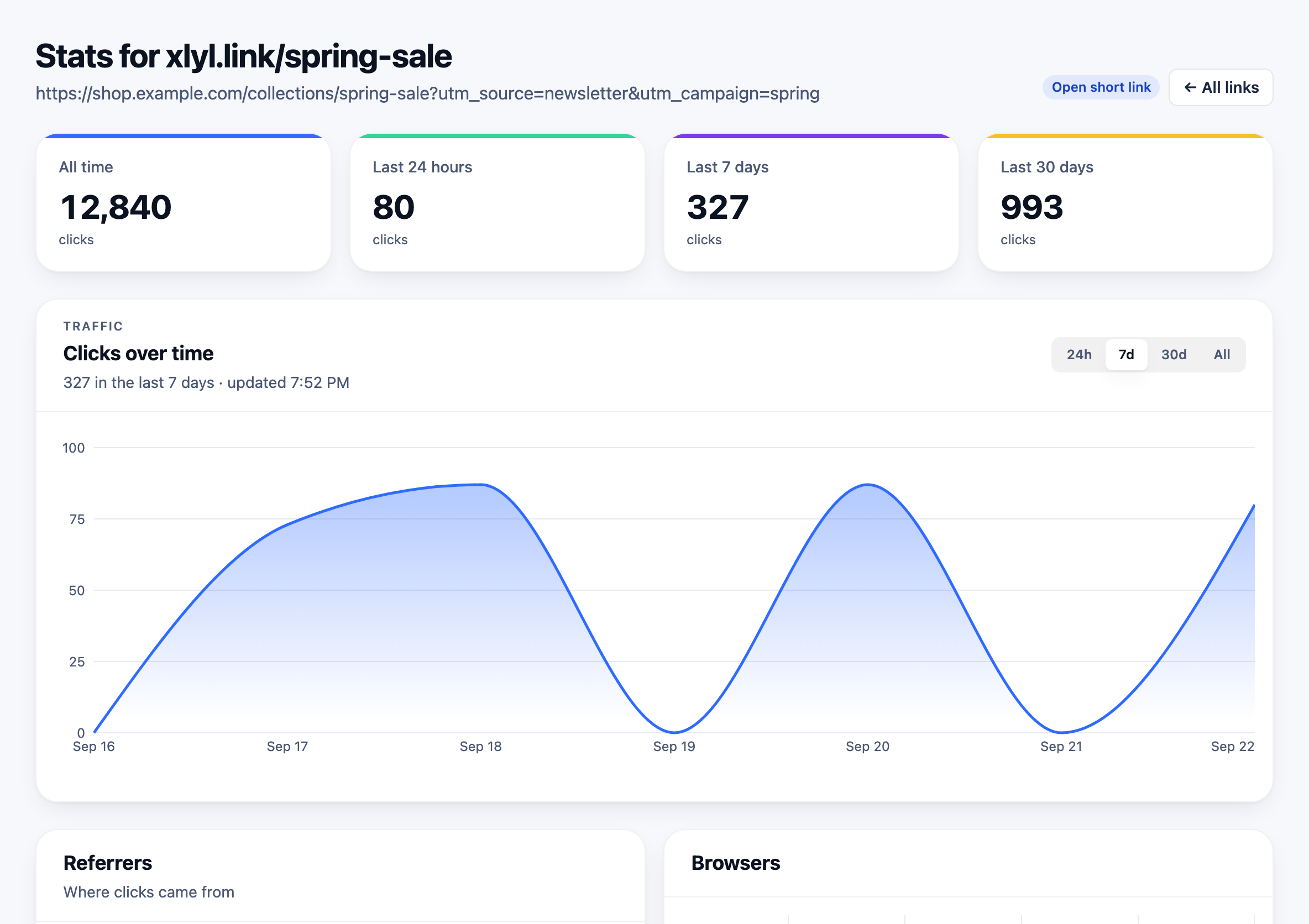
Every link created with an account has one; a link made without an account is not counted and has no statistics page. The top is the shape of the traffic — totals for the last day, week, month and all time, and a chart you can switch between those periods.
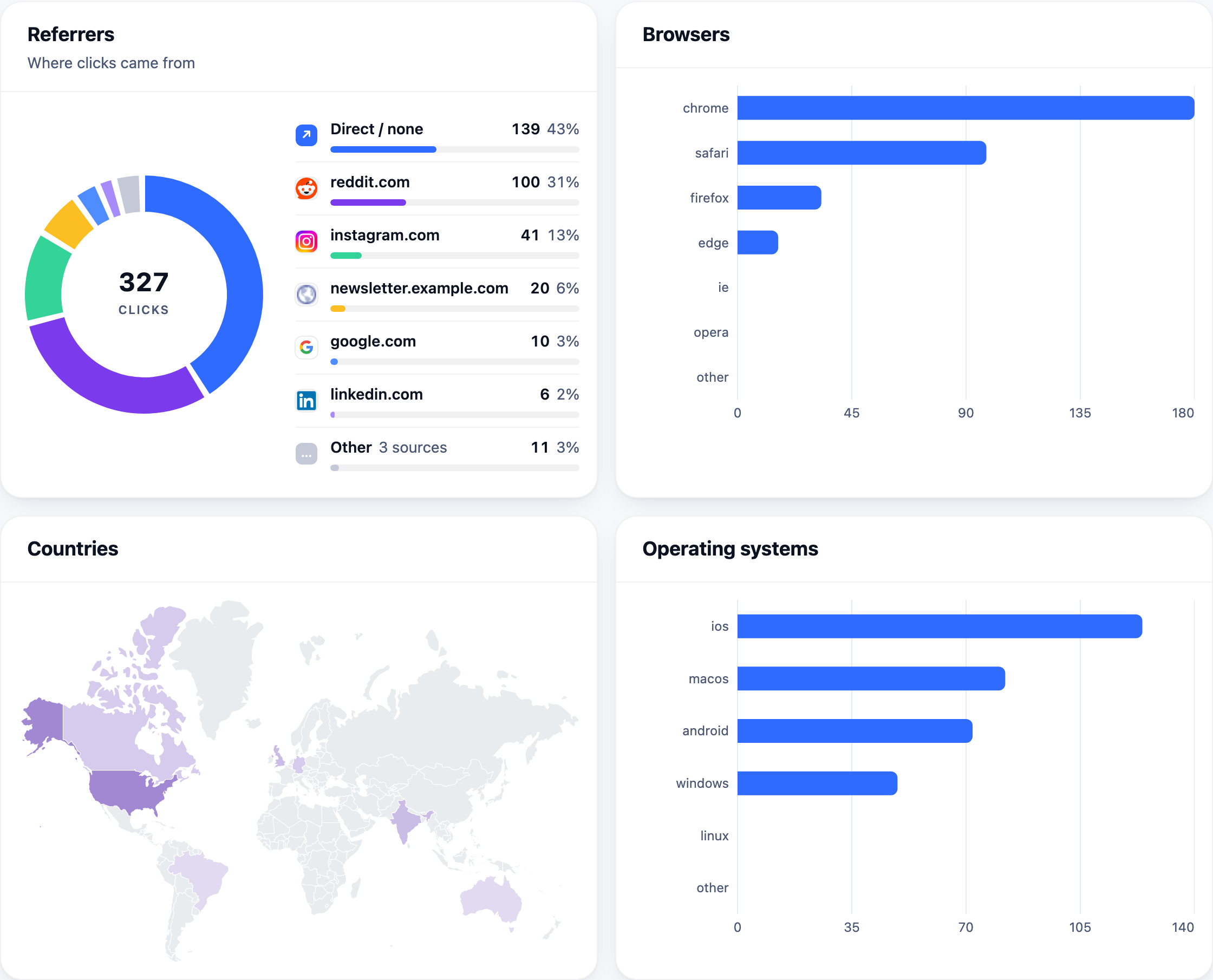
Below it, the breakdowns that answer where the traffic came from: referrer, browser, operating system and country. The referrer chart names the top sources and rolls the long tail into one row, so a link shared in fifty places still reads at a glance.
Why this beats a tracking pixel
Analytics tools measure what happens on a page you control. A short link measures the click itself, which means it works for destinations you do not control — a partner's site, an app store listing, a PDF, a marketplace product page — and it works from places where you cannot run code: print, SMS, podcasts, slides.
It also answers a different question. Page analytics tell you how many visits arrived; link analytics tell you how often your link in that channel was clicked. Put a different short link in each channel and the comparison is immediate.
Tracking campaigns with short links
Analytics on one link shared everywhere tell you a total and nothing else. The discipline that makes them useful is one short link per placement — the newsletter, the Instagram bio, the printed flyer and the sales deck each get their own — so every count answers a question.
One link per channel
Create /launch-email, /launch-tw and /launch-ig all pointing at the same page. The dashboard then shows which channel produced the clicks without any UTM parameters or dashboard filtering.
Keep UTMs on the destination
If you also use web analytics, put the UTM parameters in the destination URL. The short link hides them from the reader, carries them through the redirect, and your analytics tool still attributes the session. The campaign tracking guide goes through this in detail.
Read the referrer column
Even with one link, the referrer breakdown shows where it travelled. A link shared once often turns up later in places you never posted it.
The same method works for anything paid per placement: the affiliate guide shows how to read the clicks you count against the sales a program reports. The naming guide covers keeping a library of links findable, and the API returns the same statistics as JSON for your own reporting.
What is never recorded
Link tracking has a reputation problem because some shorteners build advertising profiles from clicks. Xlyl records the click details above, plus the full address of the referring page and the browser's language, and nothing else: no IP addresses, no cookies on the visitor, no cross-site identifiers. Statistics are per link and visible only to the link's owner and the site's administrators.
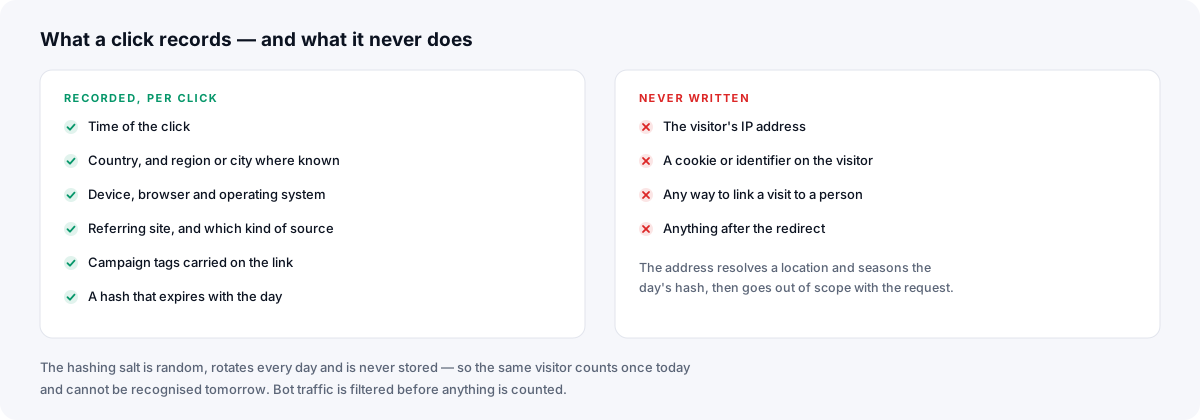
A click writes one row against the link. The visitor's IP address is used in memory to resolve a location from a local database and to compute a hash salted by a key that is replaced every day, then discarded — it is never written down. No script runs in the visitor's browser. The privacy policy sets this out in full.
That is what makes an estimate of unique visitors possible without a visitor log: the hash combines the address, the browser string and the link, so the same browser on the same connection counts once per day on that link and cannot be matched to anything once the day's salt is gone. It is an estimate, not a count of people — two people sharing a connection and browser count as one, and one person who changes network counts twice — and there is still no address in the database to leak.
A link's click total and hourly statistics last as long as the link. The per-click rows behind the detailed breakdowns — referrer URL, campaign tags, city, estimated uniques — are kept for 365 days, then deleted.
Frequently asked questions
- How do I track clicks on a short link?
- Create the link while signed in. Every click is then recorded and shown on the link's stats page: totals over time, plus breakdowns by country, browser, operating system and referrer.
- Are bot clicks counted?
- No. Besides crawlers and link-preview bots that name themselves, a click is left out when it doesn't look like a browser opening a page: no language header, a browser string without the headers that browser always sends, a request from a cloud server, a prefetch, or the same visitor again within 30 seconds. Each filtered click is listed on the link's page with its reason, so you can check what was removed. No filter catches a bot that perfectly imitates a person on a home connection, but the ones that cause phantom clicks in practice are caught.
- Does link tracking store visitors' IP addresses?
- No. The address is used at the moment of the click to resolve a location and to derive a hash whose salt is replaced every day, then discarded. Each click gets a row, but the address is in none of them.
- Can I see analytics for links created without an account?
- No. Anonymous links are not tied to anyone, so there is no dashboard to show them in. Sign in before creating a link you want to track.