Comparison
A Rebrandly alternative for branded links
Rebrandly built its product around one idea: a short link should carry your brand, not the shortener's. That idea is right, and it is the same one behind this tool. The difference is where branded links sit — the centre of a paid platform built for teams, or an included part of a free one built for individuals and small teams.
Last updated
What Rebrandly does well
Rebrandly is not a generic shortener with branding bolted on — it is a branded-link platform, and that focus shows. Domain management is its strongest area: connecting, verifying and running many domains across a team is a genuinely fiddly problem and it handles it properly.
Around that sit the things a marketing organisation actually needs once more than two people are making links: shared workspaces with roles and permissions, single sign-on, approval workflows, and integrations that put link creation inside the tools a team already works in. If several people create links under one brand and someone is accountable for what goes out, that machinery is the product, and no free tool replaces it.
Where the two differ
What the free tier is for
On a commercial branded-link platform, the free tier is an evaluation: enough to see the idea work, with the volume, domains and team features that make it usable at work on the plans above. Tier contents change, so verify anything you plan to depend on against Rebrandly's own pricing page.
Here there is one tier. Branded domains, chosen endings, editable destinations, analytics, QR codes and the API are all in it; the only limits are anti-abuse ones. The free-tier page sets out exactly what those are.
Teams versus individuals
This is the honest dividing line, and it is not about features so much as about accountability. Xlyl has accounts, not organisations: no shared workspace, no roles, no per-user permissions, no approval step before a link goes live. Several people can use one account, but the tool will not tell you who made which link.
If that matters — because links go out under a brand and someone signs off on them — Rebrandly is built for it and this is not. If your link library is effectively one person's responsibility, the machinery is overhead you are paying for.
Ownership and the exit
Both products serve links from domains you register, which means the most important property is the same in each: the addresses are portable, provided you recreate the links on the new service.
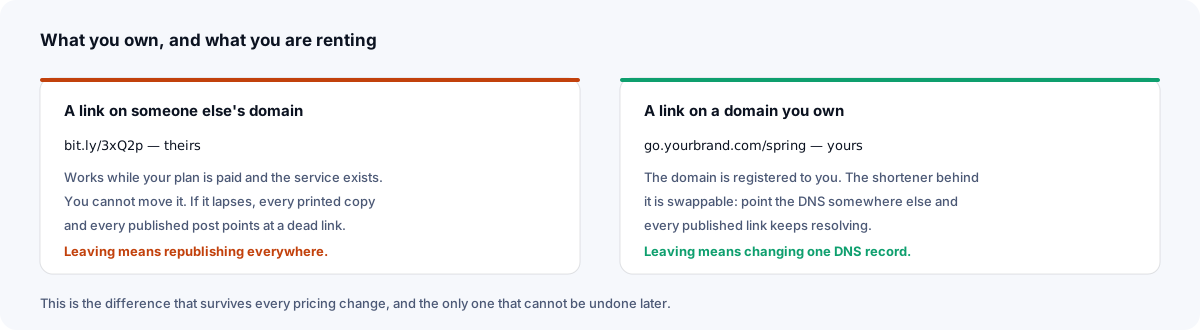
The difference is what happens underneath. Xlyl has no paid tier, and the account page exports a CSV of your links, while each link's clicks can be downloaded as CSV too, so the record of what to recreate leaves with you. With either product, leaving means recreating the links on the new service before the domain is repointed.
What is stored about visitors
Xlyl records the detail of each click but never the visitor's IP address, so there is no visitor address to retain, export or lose. The cost is segmentation keyed to an individual visitor, which the stored data does not support. Which side of that trade you want is worth deciding before you compare feature lists.
Agencies and several brands at once
A large share of branded-link users are agencies, or in-house teams running more than one brand. It is worth being precise about what works here and what does not, because the answer is genuinely mixed.
What works. Multiple domains on one account are free, with no fixed limit per account, and each domain keeps its own alias namespace — so go.clienta.com/spring and go.clientb.com/spring coexist without a clash, which is exactly the problem that bites when you run campaigns for several brands with the same seasonal vocabulary. Every link carries a description field, and the dashboard searches target, alias and description together, so a naming convention plus a client prefix gives you a workable library. The naming guide sets out a convention worth agreeing before the first hundred links.
What does not. There is no separation by permission — only by convention. One account holds every client, so anyone with the login can see and edit every link, and the tool will not tell you who changed what. There is no way to hand a client read-only access to their own links, no approval step, and no audit trail if a destination is repointed. For a solo operator or a small studio that is usually acceptable. For an agency with staff turnover and client contracts that specify access control, it is not, and that is a reason to pay for a platform built around workspaces.
The practical middle path some people use is one account per client, each with that client's domain. It is more logins to manage, but it gives real separation and means handing over the account is a clean way to hand over the links at the end of a relationship.
Side by side
| Capability | Rebrandly | Xlyl |
|---|---|---|
| Branded domains | Core product; count varies by plan | Included; no fixed limit per account |
| Custom alias | Yes | Yes, 1–64 characters |
| Edit destination after sharing | Yes | Yes, any time |
| Click analytics | Depth and retention by plan | Per-link breakdown with an account, known bots filtered |
| Password protection | Yes, in the dashboard and API | Included |
| Expiring links | Plan-dependent | Included |
| QR codes | Yes | Included |
| API | Yes, limits by plan | Included, full coverage |
| Workspaces, roles, SSO | Yes | No |
| Marketing tool integrations | Extensive | API only |
| Paid tier | Yes; features and limits vary by plan | None: one free tier with anti-abuse limits |
Rebrandly's column describes the shape of its offering rather than a named plan. Verify specifics on their pricing page.
Moving a branded domain across
Because the domain is yours, this is the easy direction of travel and nothing you published has to change.
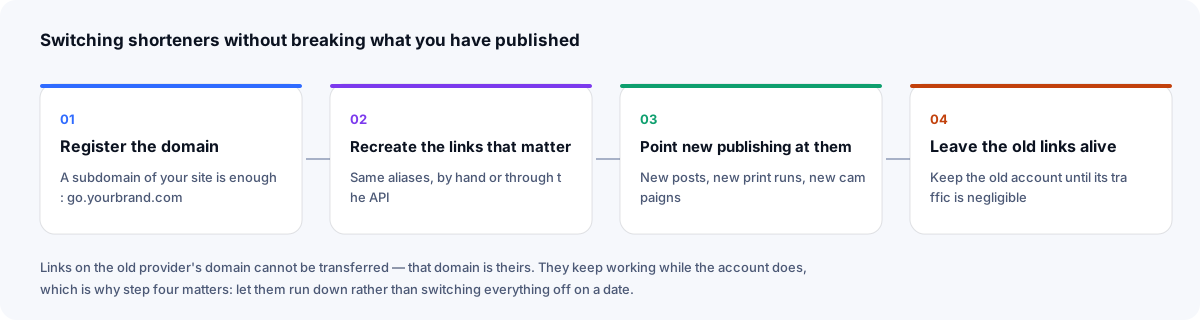
- Export your link list so you know which aliases still earn their place.
- Add the domain on the domains page and recreate the aliases — by hand, or with the API for a long list.
- Change the DNS record to point here. Use Check domain to confirm it works, HTTPS included.
- Keep both accounts briefly. Once traffic on the old one has stopped, close it.
Recreate the aliases before switching the DNS and the changeover is seamless: the moment the record propagates, the same links resolve here. The custom domain guide covers the DNS side in detail.
Who should choose which
Choose Rebrandly if links are a team activity — several people creating under one brand, with roles, sign-off, single sign-on, and integrations into the tools they already use. That is a real product requirement and this tool does not meet it.
Choose this if branded links are the requirement and the team machinery is not: you want your domain on every link, per-link analytics, the ability to change a destination after it is printed, and no monthly bill — with CSV exports of your links and their clicks if you ever move on.
Sources
- Rebrandly: how do I make a link password-protected? — password-protected links in the dashboard and through the API
- Rebrandly pricing
Checked 23 September 2026.
Frequently asked questions
- Is there a free Rebrandly alternative with custom domains?
- Yes. Branded links on your own domain are part of the single free tier here — one DNS record, added in settings, and served over HTTPS once the certificate is in place. There is no plan above it to unlock anything.
- Can I use several branded domains on one account?
- Yes. There is no fixed limit on domains per account: add the ones you need and choose which one a link uses when you create it. Each domain has its own alias namespace, so the same ending can exist on two of your domains without clashing.
- Do I need a paid plan for link analytics?
- No. Every link you make with an account has its own statistics page: clicks by hour and day, referrer, country, browser and operating system, with known bots filtered before counting and no visitor IP addresses stored.
- What does Rebrandly do that this does not?
- Team workspaces with roles and permissions, single sign-on, deep integrations with marketing and sales tooling, link-level approval workflows, and a commercial support relationship. If your requirement list includes those, that is a genuine reason to choose it.
- Can I move branded links from Rebrandly?
- If the links are on a domain you registered, yes — recreate the aliases here, then point the domain here, and the recreated addresses keep resolving. That portability is a property of owning the domain, not of either product.