Product
Password-protected links: share a URL, not access to it
Sometimes a link needs to travel through a public channel — a group chat, a printed handout, a public post — without the destination being public. A password on the short link puts a door in front of it.
How it works
When a protected link is opened, Xlyl shows a password prompt instead of redirecting. The visitor types the password; if it matches, they are sent to the destination and the click is counted. If not, they are told the password is wrong and nothing about the destination is revealed — not the URL, not the title, not a preview.
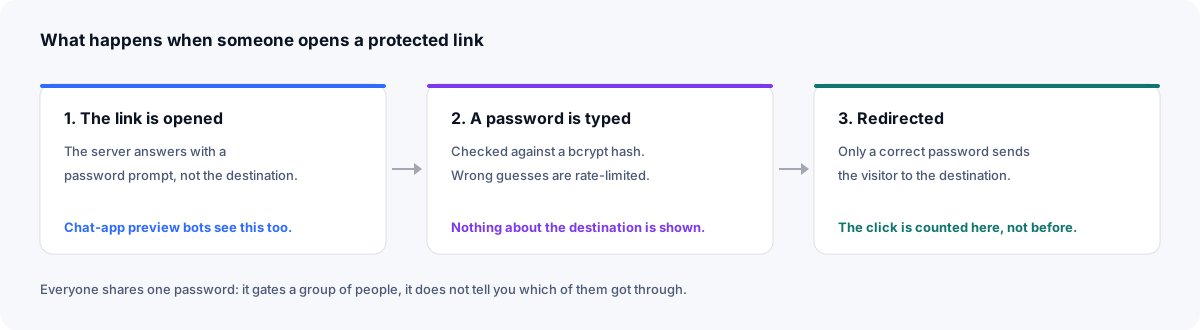
The password is hashed with bcrypt before it is stored, so a copy of the database does not expose it. Because of that, it cannot be shown to you again: if it is forgotten, set a new one. Attempts are rate-limited per address, so a script cannot sit and guess.
Link-preview bots in chat apps get the prompt too, which is why a protected link pasted into a group chat unfurls without the destination's title or image — the preview is exactly as much as a stranger would see.
Creating a protected link
Sign in and open advanced options
On the homepage, tick “Advanced options”. Protection needs an account so the password can be managed later.
Set the password
Fill in the Password field alongside the URL, then shorten. It can be 3 to 64 characters. Add a custom alias if people will type the link, and consider an expiry if the share is temporary.
Choosing a password worth having
Every visitor types the same password, and it usually travels by message or word of mouth, so it has to be easy to pass on and hard to guess — the two pull against each other. Three or four ordinary words, like harbour-lamp-october, manage both: easy to say over the phone, and much harder to guess than a single word.
- Avoid anything printed next to the link — the event name, the company, the year.
- Use a different password for each link. If one leaks, only that link needs a new one.
- Change it when the group changes. Editing the link replaces the password at once; the link itself stays the same.
Changing or removing protection
Edit the link from your dashboard and type a new password to replace the old one — the change is immediate, and anyone with the old password is locked out. The link, its alias and its statistics are untouched.
A password cannot be taken off a link once it is set. If a link should open for everyone again, delete it and create it afresh with the same alias: the address people have stays the same, though the new link's statistics start from zero.
What it is for — and what it is not
Protected links suit previews, drafts, event materials, internal documents shared via public tools, and anything with a small audience and a public route to it. Every visitor uses the same password, so this is access control for a group, not per-person authentication: it cannot tell you who got through, only that someone with the password did.
It also does not protect the destination itself. Once through, the visitor has the real URL and can share it. If the destination must stay private, protect it at the destination as well — what a short link can and cannot hide is worth knowing before you rely on one.
Frequently asked questions
- How do I password-protect a link?
- Sign in, tick 'Advanced options' on the homepage, and type a password in the Password field before shortening. Anyone opening the short link is asked for it before being redirected.
- Is the password stored securely?
- Passwords are hashed with bcrypt before they are stored, the same way account passwords are. The plaintext is never kept and cannot be recovered — not even by the link owner.
- Can I add or remove a password on an existing link?
- You can add one or change it by editing the link in your dashboard. A password can't be removed from a link once set: to make it open again, delete the link and create it afresh with the same alias — which starts its statistics from zero.
- Does a password-protected link still count clicks?
- Yes. A click is recorded when the correct password is entered and the visitor is redirected, so statistics count only the visits that got past the prompt.