affiliate · marketing
Short Links for Affiliate Marketing: A Practical Guide
How affiliates tidy long tracking URLs, measure which placement earns, re-point links when a program changes, and stay within disclosure rules.
8 min read
social · marketing
How Instagram, X, TikTok, LinkedIn, YouTube and WhatsApp treat links, what a branded link tells readers, and how to run a link-in-bio on your domain.
There's no single best URL shortener for social media, because "social media" is eight platforms with eight different attitudes to links. Some display them, some hide them, some wrap them in their own tracker, some limit how many you get. What a shortener needs to do for you on Instagram is not what it needs to do on X or in a WhatsApp broadcast.
What stays constant is why you want one: a link that carries your name rather than a random code, that you can change after posting, and that counts taps per placement so you know which post, story, bio or group actually sent people. This guide goes platform by platform, then covers the link-in-bio pattern that works on all of them, and finishes with what to look for in a shortener if social is where most of your links live.
On a web page, a link is a blue word. On social, it's usually the address itself, or a preview card built from it, sitting next to your name. Readers judge it in a glance:
go.yourbrand.com/spring says who sent it and what it is. It looks deliberate.xlyl.link/spring on a clean, well-run shortener domain is fine.A custom domain is one DNS record. It shows most on social, where your links are read cold by people who don't know you yet.
Links in captions aren't clickable. That leaves three places: the profile (up to five links without a subscription, per Meta's help centre), story stickers (a link per story), and DMs. Since the audience can't click a caption link, the profile links have to carry everything, which is where the link-in-bio pattern below comes from.
What a shortener does here: a branded bio link that never changes (go.you.com/links), a separate short link behind each story sticker (/story-launch, /story-sale) so each story's taps are its own number, and editable destinations so a story link can be re-pointed after the story expires — or after you notice you linked the wrong page.
Referrer data from Instagram's in-app browser is thin; the per-link count is the reliable signal.
Every link is wrapped in t.co and counted as 23 characters whatever its real length, so shortening for length is pointless. Shorten for the other reasons: the displayed address (X shows the original domain in the preview card, so a branded domain is visible), editability, and your own count separate from the platform's.
One short link per tweet, not one per campaign. When a tweet is quoted or screenshotted, its link travels with it, and you'll want to know that.
Where TikTok lets you put a link, and how many, depends on the account and changes over time, so check the platform's current rules before planning around it. Where you have a profile link, the same approach as Instagram works: a branded, editable link and a hub page behind it. TikTok is a phone app, so build the destination for phones and patchy connections.
Links are clickable in posts and comments, and LinkedIn shows a preview card with the destination's title and image. Two conventions matter here: a branded domain reads as professional in a feed full of them, and posts with the link in the first comment rather than the body are common because members believe body links reduce reach. Either way, give the link its own alias per post (/report-li, /webinar-li) so you can see whether the comment trick is doing anything.
Clickable links in posts with a preview card, plus groups, pages and Messenger. A branded domain means your links don't share a domain, or its reputation, with strangers' links. In groups, a plain description next to the link — "Our September menu (PDF)" — tells people what they're tapping, and works as a preview for the cautious.
Where a link is clickable depends on the placement, according to YouTube's help page on external links (checked 23 September 2026):
| Placement | Clickable? |
|---|---|
| Long-form video description | Yes, once the channel has advanced features |
| Comments on long-form videos | Yes, once the channel has advanced features |
| Shorts description and Shorts comments | No |
| Posts | No |
The long-form description is long-lived and gets edited rarely, so the links in it should be short, branded and editable: a /gear link in three hundred video descriptions can be updated once, in the shortener, when the gear changes. Say the link aloud in the video, or show it on screen in a Short where it can't be tapped — which is the strongest argument for a readable alias there is.
Links are clickable and previewed; the preview is fetched by the app (which is why the link shows a click before anyone taps — see bots and previews). Broadcasts and groups are effectively a channel of their own, so give them their own short link (/sale-wa). Messaging links get forwarded, so the count can exceed the group's size; that's reach, and it's good to know.
Clickable links, preview cards, generous limits. Treat as LinkedIn: branded domain, one alias per post, description next to the link.
Profiles hold only a few links (Instagram allows up to five) and captions often none. The common solution is a third-party "link in bio" page that lists your destinations. It works, but you're renting: the domain is theirs, the design is theirs, the click data is theirs, and the page lives as long as the service does.
The same result on your own domain takes a short link and a simple page:
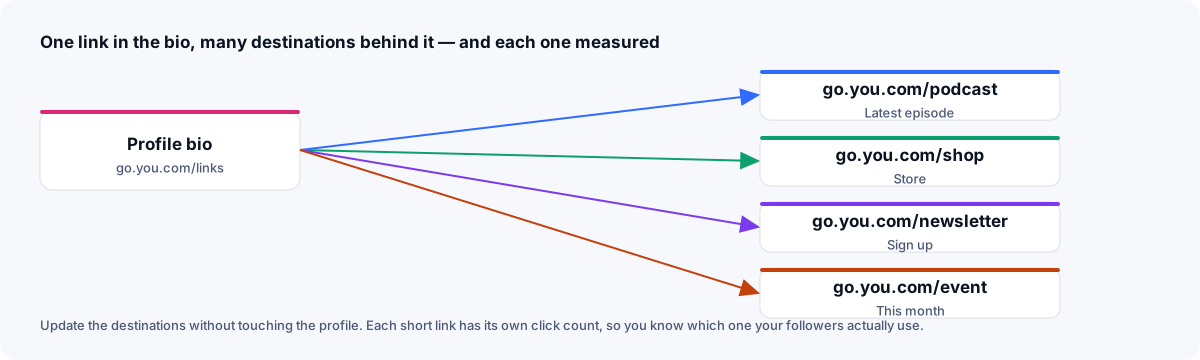
go.you.com/podcast, /shop, /newsletter, /event.go.you.com/links — in every bio.Now the bio never changes. When the podcast has a new episode, edit /podcast's destination. When the event is over, edit /event. And because each destination is its own link, you know which one your followers actually use, per platform if you make platform variants (/podcast-ig, /podcast-tt). You keep the domain, the data and the design.
Follow the rule that works everywhere: one short link per placement. Per post on X and LinkedIn, per story on Instagram, per bio, per broadcast. Then:
Known bot traffic — preview fetches, scanners that identify themselves — is filtered by user agent before counting, so the number is closer to people, though not a head count. Counting needs an account: links made without one aren't counted. Each click keeps its country, device and source; visitor IPs are never stored.
If your site analytics need to know the source too, put UTM parameters on the destination behind each short link; the shared link doesn't show them, though the destination's address bar does.
In rough order of how much difference each makes:
Xlyl covers all seven, free, which is why it's the answer this site gives; the comparison pages set it against the usual alternatives if you'd rather see the reasoning.
affiliate · marketing
How affiliates tidy long tracking URLs, measure which placement earns, re-point links when a program changes, and stay within disclosure rules.
· 8 min read
qr · marketing
Where QR codes get scanned, how large to print them for the distance, why the code should hold a short link, and how to measure visits per placement.
· 8 min read
marketing · analytics
Which UTM parameters to use, how short links tidy the tags away, why one link per channel is the rule, and how to read link and site analytics together.
· 8 min read