Product
Free URL shortener with no ads and no signup
Xlyl is a free link shortener. Paste a long URL and get a short one back — no account, no advertising on the redirect, and no feature held back for a paid plan that does not exist.
No account needed for a plain link. Sign in for custom aliases, your own domain and click statistics.
What “free” means here
Most free URL shorteners are the entry tier of a paid product. The free plan gets a handful of links a month, no custom domain, basic or no analytics, and the short link itself belongs to the provider. Upgrade prompts follow.
Xlyl has one tier. Everything on the features page is available to every account: custom aliases, branded domains, analytics, password protection, link expiry, QR codes and the API. The only limits are anti-abuse ones:
- 50 links per account in any rolling 24 hours
- 60 link creations per 15 minutes, counted per account or, without one, per IP address
- a 10 minutes gap between links made without an account from the same address
Shorten a URL without signing up
Use the box at the top of this page, paste your link, press enter. The short link is ready to copy. Anonymous links get a short random code on the default domain and cannot be edited later, because nothing ties them to you. Their clicks are not counted and they have no statistics page.
Sign up — it takes an email address and a password — and links become yours: you can change their destination, see their clicks by time, country, device and source, and delete them.
No ads, no interstitial, no countdown
The thing people most often want from a free link shortener is that the link actually works: click, arrive. Some free services insert an advertising page between the click and the destination, sometimes with a five-second countdown. That page is where your reader gives up, and it is why some mail filters and social networks distrust those shortener domains.
Xlyl redirects directly. On a link made with an account the click is counted, the visitor lands on the destination, and nothing is shown in between.
What you get for free
Custom short links
Choose the ending yourself instead of a random code — see the custom URL shortener page for how aliases work.
Your own domain
Point a domain or subdomain at Xlyl and serve links from it. Setup takes one DNS record; the custom domain guide walks through it.
Click analytics
Clicks by hour, country, browser, operating system and referrer for every link you create while signed in, with known bot traffic filtered out. Details on the link analytics page.
Passwords, expiry and QR codes
Password-protect a link, give it an expiry, and download a QR code for it — all without a paid plan.
Why it is free
Xlyl has no paid tier. It is run by Soqode Digital Pvt Ltd, and there is no venture-backed pricing page waiting behind the free tier. The about page says more about who runs it.
Why free is the suspicious word
It is reasonable to ask how a free service pays for itself, because with most of them the answer is you. Worth being specific about what this one does not do.
- No advertising, anywhere. Not on the site, and — more importantly — not between a click and the destination. An interstitial is a tax your readers pay, and it is where malvertising lives.
- No analytics resale. There is nothing to sell: each click is recorded with its country, device and source, but visitor IP addresses are never stored and no identifier follows anyone between links. The privacy policy is the long version.
- No upsell tier. There is nothing above this one, so no feature is being withheld to create a reason to pay.
What makes that possible is unglamorous: a redirect is cheap to serve, and each click is recorded by a background job after the visitor has already been sent on — which keeps the redirect fast. If the service ever stopped suiting you, your links and each link's clicks export as CSV from your account.
Judging any free shortener
Most of the field is freemium, and the interesting part of a free tier is what it withholds rather than what it includes. These are the questions worth asking before you commit links to one.
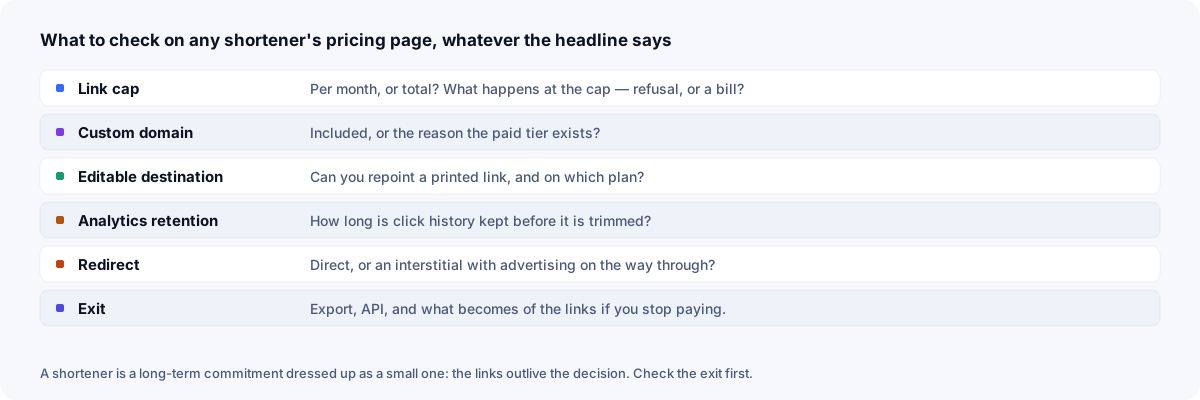
The two that catch people out are the custom domain — usually the reason the paid tier exists — and the ability to edit a destination after sharing, which is what turns a mistake into a thirty-second fix instead of a reprint. The comparison pages work through the same checklist against the products people usually weigh this against.
Frequently asked questions
- Is this URL shortener really free?
- Yes. There is no paid plan. Shortening, custom aliases, custom domains, click analytics, password protection, expiring links, QR codes and the API are all included at no cost.
- Do I need to sign up to shorten a URL?
- No. Paste a link in the box at the top of this page and you get a short link without an account. An account is only needed to keep, edit and track links — a link made without one is not counted and has no statistics page — or to use custom aliases and your own domain.
- Are there ads or an interstitial page?
- No. Visitors who click your short link are redirected straight to the destination. There is no countdown page, no advertising and no 'continue' button.
- Can I shorten URLs in bulk for free?
- Yes. The API is part of the free tier with no per-request pricing, so a script, a spreadsheet or your own system can create links in bulk, each with its own alias, domain and expiry, within the same limits as the dashboard: 50 links per account in any rolling 24 hours and 60 link creations per 15 minutes, counted per account or, without one, per IP address. There is no bulk upload form because a short script handles any source of links and any rule you want to apply to them.
- Can I take my links elsewhere?
- Your data comes with you: the account page exports a CSV of your links, and each link's clicks can be downloaded as CSV. Links on your own domain can keep the same addresses on another service, but only once you recreate them there — each alias and its destination — and move the domain's DNS and HTTPS.
- Is there a limit on how many links I can create?
- Yes, anti-abuse limits, none of them a paid-tier limit: 50 links per account in any rolling 24 hours, 60 link creations per 15 minutes, counted per account or, without one, per IP address and a 10 minutes gap between links made without an account from the same address.