Comparison
A free Bitly alternative: Xlyl compared honestly
Bitly is the default for good reasons, and most people who leave are not unhappy with it — they have hit the edge of the free tier, usually at the custom domain. Here is what genuinely differs between the two, what Bitly does better, and how to move without breaking anything you have already published.
Last updated
What Bitly does well
Worth saying first, because a comparison that only lists a competitor's shortcomings is an advertisement, not a comparison.
Bitly has been doing this for well over a decade, and that shows in the places it is hard to compete: uptime and redirect latency at enormous scale, a link domain that is widely recognised, integrations built into the marketing tools teams already run, and an organisation you can buy a contract from. For a marketing department with a procurement process, those are not luxuries — they are the requirements list, and no free tool satisfies them.
Its analytics are also more elaborate than ours: campaign grouping, team dashboards and reporting features that go beyond what a per-link breakdown gives you. If a team of a dozen people needs shared workspaces and role-based access, that is a real product requirement and this is not the tool for it.
Where the two genuinely differ
The pricing model, not the price
Bitly is freemium: a free tier that works, with the features most businesses eventually need arranged on the plans above it. Specific caps and tier contents change — verify them on Bitly's pricing page rather than trusting any comparison page, including this one.
Xlyl has one tier and it is free. Everything on the features page is available to every account. The limits that exist are anti-abuse — a daily creation cap per account, a cooldown for anonymous links — not commercial ones, and they are documented rather than discovered.
Who owns the link
This is the difference that cannot be undone later.
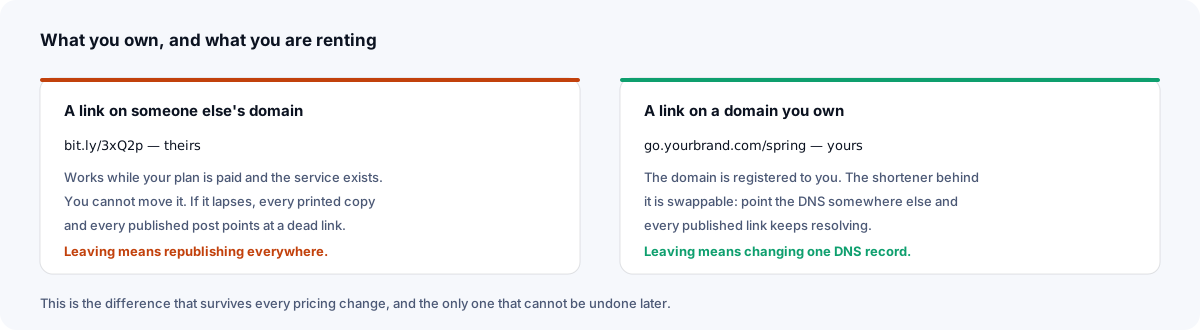
A bit.ly link is Bitly's address with your destination behind it. Bitly says bit.ly links keep working after a downgrade, but the address cannot come with you if you leave. A link on go.yourbrand.com is yours, whoever operates the shortener behind it: if you leave, you recreate the links on the new service and repoint the domain, and every printed card, old newsletter and embedded QR code keeps working. The custom domain guide is a five-minute job, and the domains page checks the DNS live so you know it resolved before the first link goes out.
What is kept about your visitors
Xlyl keeps the per-click detail — campaign, channel, device, city — but never the visitor's IP address: repeat visits are estimated through a per-link hash whose salt is replaced daily and never written to the database. You get the breakdown without there being a visitor address in the database to export, subpoena or leak.
What you can take with you
Xlyl has no paid tier to lapse. The account page exports a CSV of your links, and each link's clicks can be downloaded as CSV, so if the service ever stops suiting you, you leave with the list of what to recreate. Links on your own domain keep their addresses once they are recreated elsewhere and the domain is repointed.
Feature comparison
Structural rather than plan-by-plan, for the reason above: tier contents change, models do not.
| Capability | Bitly | Xlyl |
|---|---|---|
| Short links | Yes, on bit.ly or a custom domain | Yes, on the shared domain or your own |
| Custom domain | On paid plans | Included; no fixed limit per account |
| Custom alias | Constrained on the free tier | Included, 1–64 characters |
| Edit destination after sharing | On paid plans | Included, any time |
| Click analytics | Depth and retention scale with the plan | Hour, day, referrer, country, browser, OS; known bots filtered |
| Password-protected links | Check Bitly's pricing page | Included |
| Expiring links | On some paid plans | Included |
| QR codes | Yes, with plan-dependent customisation | Included, encodes the short link |
| API | Yes, rate limits by plan | Included, one key, full coverage |
| Team roles, SSO, audit logs | Yes, on higher tiers | No |
| Support commitment | Yes, contractual on paid plans | No support contract |
| Paid tier | Yes; features vary by plan | None: one free tier with anti-abuse limits |
Bitly's column describes the shape of its offering rather than a specific plan, because plan contents change. Check their pricing page for anything you intend to rely on.
Moving across without breaking anything
Treat it as a change of default rather than a migration. Nothing has to happen on a date.
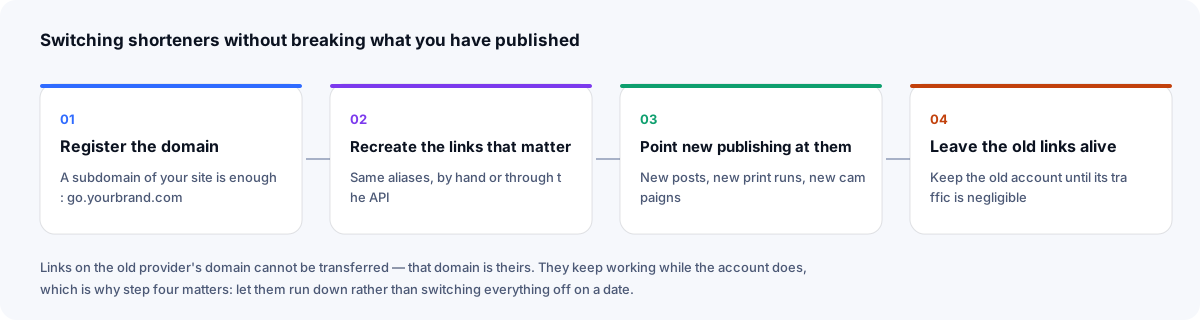
- Create an account and add your domain on the domains page. Use Check domain to confirm it works here before you rely on it.
- Export your links from Bitly. That file is your inventory: it tells you which links still get traffic and therefore which are worth recreating.
- Recreate the ones that matter with the same endings, by hand or through the API. Agree a naming convention before you start, not after the first hundred.
- Point new publishing at the new links, and leave the old account open while its links still receive traffic. bit.ly links cannot be redirected to yours — that domain is Bitly's — so let them run down rather than switching them off.
If your Bitly links were already on your own custom domain, this is simpler still: recreate the aliases here first, then change the DNS record, and every link you recreated keeps working with no republishing at all.
Who should stay with Bitly
If any of these is on your list, stay where you are — no amount of free is worth failing a requirement:
- A support contract with a response-time commitment, or a named account manager.
- Single sign-on, audit logs, or role-based access for a team that shares a link library.
- Integrations that already sit inside the marketing tools your team uses daily.
- A procurement or security process that requires a vendor questionnaire, a DPA and a company on the other end of it.
If instead you want branded links you own, per-link analytics, and no bill, shorten one link and see what the page gives you — no account needed for a plain one. The comparison framework covers the same ground for other products, and the free-tier page sets out exactly which limits exist here and why.
Sources
- Bitly: how do I set an expiration date for my links and QR Codes? — link and QR Code expiry on some paid plans
- Bitly: what happens when I downgrade to a lower subscription plan? — what happens to bit.ly, complimentary-domain and custom-domain links
- Bitly pricing
Checked 23 September 2026.
Frequently asked questions
- Is there a free alternative to Bitly with custom domains?
- Yes. A custom domain is part of the single free tier here: add one DNS record, add the domain in settings, and every link you create can live on it. There is no plan to upgrade to, because there is only one plan.
- Can I transfer my Bitly links to another service?
- Links on bit.ly itself cannot be transferred, because that domain belongs to Bitly. Links on a custom domain you own can: recreate the aliases on the new service, then point the domain at it, and the addresses you recreate keep resolving. Export your link list first — it is the record of what to recreate.
- What happens to my Bitly links if I stop paying?
- Bitly says bit.ly links keep working after a downgrade to a lower plan. Links on a complimentary domain stop working when that domain's registration expires, and links on your own custom domain keep working but Bitly stops renewing their SSL certificate. This varies by provider and changes, so check Bitly's current help pages before you rely on it.
- Does this Bitly alternative show ads on the redirect?
- No. There is no advertising, no interstitial and no countdown anywhere between the click and the destination — not on any tier, because there is only one.
- Is a free shortener good enough for a business?
- For creating, branding, measuring and editing links, yes. For a procurement process that requires single sign-on, audit logs, a support contract or a named account manager, no — and that is the honest reason to stay with a commercial vendor.