Company
Privacy policy
What Xlyl collects, what it deliberately does not, and what you can do about either. This describes what the software running this site actually does.
Who is responsible for this data
Soqode Digital Pvt Ltd operates the service at xlyl.link and is responsible for the data held on it and is the party to contact about it at contact [at] xlyl.link.
Everything below describes what the software running this site records. It does not cover any logging done by the hosting infrastructure outside the application.
If you only click a short link
Most people who encounter this service never create an account. They follow a link someone else made. This section is about them, and it is the shortest section in the policy on purpose.
What is recorded
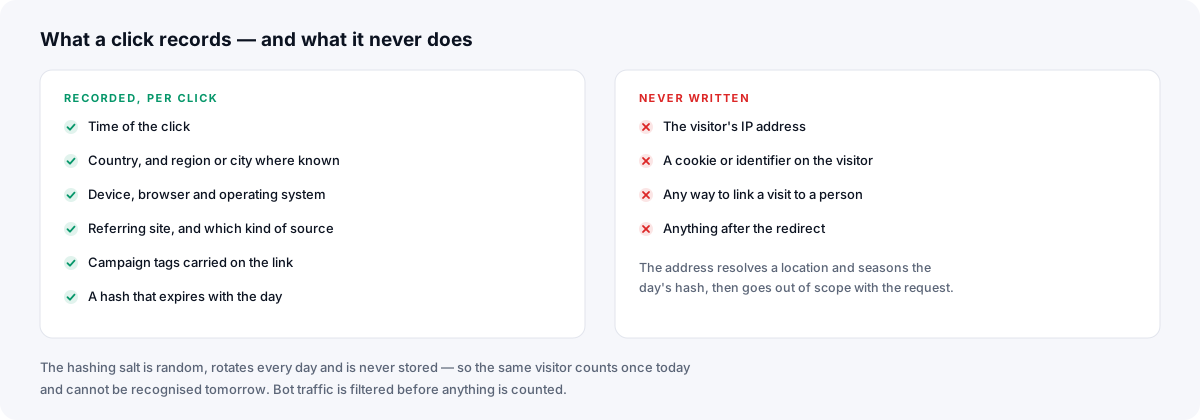
When a short link made with an account is opened, a row is written against that link: the time, the country and — where the local database can resolve one — the region and city; whether the device is a phone, tablet or computer; the browser and operating system with their versions; the site the click came from, the full address of the referring page (up to 512 characters) and which kind of source that is; any campaign tags on the link; the browser's language preference; the app the link was opened in, when that app's built-in browser names itself; and the per-link visitor hash described below. Clicks on links created without an account are not recorded or counted at all.
That row describes the click. It holds no name and no IP address, and nothing in the database joins your clicks on different links together: the visitor hash is specific to one link and one day.
Clicks that are not a person opening the link are left out of the counts. To tell, the server reads what your browser already sends with the request — its browser string, whether it asked for a web page, its language header and the security headers modern browsers add — and checks the address against the published ranges of cloud providers (AWS, Google Cloud, Oracle, DigitalOcean, Linode), whose servers run scanners and scrapers rather than people. A second click by the same visitor within 30 seconds is the same click. None of those headers are stored. A filtered click still gets the row described above, marked with the reason it wasn't counted, so the link's owner can see what was left out; at most 1,000 such rows are kept per link per day.
How repeat visits are counted without identifying you
A link's owner reasonably wants to know whether a hundred clicks were a hundred people or one person clicking a hundred times. Answering that exactly would mean identifying visitors, so here the answer is an estimate instead.
Each click stores a hash of your IP address, your browser string and the link, with a random salt that changes every UTC day. The salt lives only in the server's cache, is never written to the database, and is deleted about an hour after its day ends. Within that day the same address and browser produce the same hash on a given link and count as one unique visitor — an estimate, not a count of people. Because the link is part of the hash, the same visitor has unrelated hashes on different links. Once the salt is deleted, a stored hash can no longer be matched to anything — not by the operator, not by anyone who obtains a copy of the database.
What is not recorded
Your IP address is not written to the database or to the application's request log. A click on an account link waits in the server's job queue for the moment it takes to be counted; the worker uses the address to look up a location from a local database that ships with the software, to compute the visitor hash above and to check it against the cloud ranges, which are downloaded once a day — no request about you leaves the server — and the job is then deleted, whether counting succeeded or not. No click row holds an address, so there is none to export, subpoena or leak.
Signing in, signing up, resetting a password, entering a link password, reporting a link and creating one are rate-limited. For those requests the address (or, when creating links, your account if you are signed in) is the key of a counter in the server's cache, which is deleted when its 15-minute window ends. Following an ordinary short link touches no counter.
No cookie is set on you, no identifier is assigned, and no script runs in your browser. A short link answers with an HTTP redirect and nothing else; whatever happens on the destination site is between you and that site, and this service has no visibility of it. How URL shorteners work explains the mechanism in full.
Checking a link before you follow it
You do not have to trust a short link to find out where it goes. Adding a + to the end of a link on this service shows the destination instead of redirecting you to it. The exception is a password-protected link: its destination is never shown, and the + leads to the password prompt. Are short links safe? covers the other ways to check one.
If you create links without an account
Anonymous link creation, where the operator has left it enabled, stores your IP address in a table used only to enforce the 10-minute cooldown between anonymous links from one address. It exists to stop one machine generating links in bulk.
That record is deleted within about five minutes after the cooldown ends — a scheduled job runs every five minutes and removes expired rows. It is not attached to the links you made, and it is not used for anything else.
Account holders' IP addresses are not stored when they create links.
If you have an account
What you give us
An email address and a password. The address is used to verify the account, to send a password reset if you ask for one, and to confirm a change of address. The password is never stored: what is kept is a bcrypt hash of it, which cannot be reversed into the original.
If you generate an API key, only a hash of the key is stored. The key itself is shown to you once, at the moment it is created, and cannot be recovered afterwards — which is why the API key page says to copy it then.
What you create
Your links: the destination URL, the short alias, any description you add, the domain it is on, an optional expiry, and — if you protect a link — a bcrypt hash of the link's password. Plus the click statistics described above, attached to each link.
Any custom domain you connect is stored as the hostname and its optional homepage. Nothing about your DNS provider or registrar is collected; the domain check resolves the name publicly and requests the domain, the way any visitor's browser would.
Your session
Signing in sets one cookie containing a signed session token. It is marked HttpOnly, so no script can read it, and SameSite=Lax. It is the only cookie this service sets, there is no analytics or advertising cookie anywhere on the site, and signing out clears it.
Anti-abuse records
If the operator has configured Google Safe Browsing, targets are checked against it when links are created, and an account that repeatedly submits flagged URLs accumulates timestamps used to apply a cooldown. Those timestamps are attached to the account and hold no other information.
Third parties
The software calls out to very few places, and most of them are optional and switched off unless the operator configures them.
- Email delivery. Verification, password reset and address-change messages are sent through whatever mail service the operator has configured. Your email address passes through it.
- Google Safe Browsing, if a key is configured. The destination URL of a link being created is checked against it. No personal data is sent.
- reCAPTCHA, if configured. Google's script loads only where the shorten form is shown to someone who is not signed in. Your browser then contacts Google, which receives your IP address and may set its own cookies, subject to Google's own privacy terms. No other page loads it.
- Country lookup uses a local database bundled with the software. No request leaves the server, and no third party sees a visitor address.
There is no advertising network, no analytics script, no session recording, no heat mapping and no data broker anywhere in this service — on the site or on the redirect path, apart from the administrators' affiliate links described below. That is a design decision as much as a privacy one: why it is free without advertising explains how that works.
Affiliate links
Links that the site's administrators create to Creative Market or MyFonts are sent through the operator's affiliate links with Commission Junction, and links they create to ThemeForest through the operator's affiliate link with Envato. A visitor who follows one of those links passes through that network's redirect on the way to the destination, and a purchase made there can earn the operator a commission.
Other users' links are never rewritten. They go exactly where they were saved, including any referral code of your own.
How long things are kept
| What | Kept for |
|---|---|
| Account record | Until you delete the account |
| Links and their statistics | Until you delete the link, it expires, or the account is deleted |
| Click totals and hourly statistics | As long as the link they belong to |
| Per-click detail (referring page, campaign tags, language, city, visitor hash) | 365 days, then deleted by a scheduled job |
| The daily hashing salt | In the cache only, never the database; deleted about an hour after its UTC day ends |
| Anonymous creator IP | The 10-minute cooldown, then deleted within about five minutes |
| Custom domain hostname and homepage | Kept after you remove the domain or delete the account, no longer linked to you |
| Verification and reset tokens | Until used or replaced by a new one. An expired token stays, hashed and unusable, on the account record |
| Session cookie | Until you sign out or it expires |
Deleted links are removed along with the statistics attached to them. Expired links are swept away by a scheduled job rather than lingering.
What you can do
- Get a copy. Your account page downloads a CSV of every link you own. Each link's clicks download as a CSV too: the dashboard button covers the last 90 days, and the API's CSV endpoint goes back up to 365 days or 50,000 rows. Statistics are also available through the API. There is no single download of everything.
- Correct it. Email address and password are changed from the account page; every link is editable.
- Delete it. Deleting the account removes it, your links and their statistics at once. It is immediate and it cannot be reversed. The hostnames of any custom domains you connected are kept, detached from the account.
- Take it with you. If your links live on a domain you own, you can keep the same addresses on another service by recreating the links there — the same aliases and destinations — and moving the domain's DNS and HTTPS to it.
Depending on where you live you may also have rights to object to or restrict processing, or to complain to a supervisory authority. Contact the operator of this site to exercise any of them.
Security
Passwords and link passwords are hashed with bcrypt. API keys are stored hashed. Session tokens are signed and delivered in an HttpOnly cookie. The service is served over HTTPS, including on custom domains once their certificate has been issued.
No service can promise it will never be breached. What this one can say is that the most sensitive thing it could lose — a log of who visited which link — does not exist to be lost.
Changes to this policy
If the software changes what it collects, this page changes with it and the date below changes too. Material changes to the hosted service are announced by the operator.
Last updated: 23 September 2026.
Frequently asked questions
- Do you store the IP address of people who click my links?
- No. The address is held for the moment it takes to count the click, to resolve a location and to derive a per-link visitor hash, then discarded. It is not written to the application's logs either. For links made with an account, a row is written for each click — with time, location, device, browser, referring page, language and any campaign tags — but the address itself never reaches the database. Clicks on links made without an account are not recorded.
- You record each click. How is that not tracking me?
- Nothing in the row names you, and nothing in the database joins your clicks on different links. Repeat visits are estimated using a hash of your address, your browser string and the link, with a random salt that changes every UTC day. The salt is kept only in the server's cache, never in the database, and is deleted about an hour after its day ends; after that the hash cannot be matched to anything. Because the link is part of the hash, the same visitor has unrelated hashes on different links. There is no profile and no identifier that follows you between links.
- Do short links set cookies on visitors?
- No. A visitor who follows a short link receives a redirect and nothing else: no cookie, no identifier, no script. The only cookie this service sets is the session cookie for people signed in to the dashboard.
- How do I delete my data?
- Delete your account from the Account page. That removes the account record, every link you created and the click statistics attached to those links. It is immediate and cannot be undone.
- Can I get a copy of my data?
- Yes, in parts. The Account page downloads a CSV of every link you own. Each link's clicks download as a CSV too: the dashboard button covers the last 90 days, and the API endpoint goes back up to 365 days or 50,000 rows. Statistics are also available through the API. There is no single download of everything.
- Who is responsible for my data?
- The operator of this site, Soqode Digital Pvt Ltd, is responsible for the data held on it. This policy describes what the software running this site records; it does not cover any logging done by the hosting infrastructure outside the application.